At a glance
| Concept | Azure | AWS | GCP |
|---|---|---|---|
| Virtual network | VNet | VPC (Virtual Private Cloud) | VPC (Virtual Private Cloud) |
| Network scope | Regional | Regional | Global |
| Subnet scope | Inside the VNet’s region | Inside an availability zone | Regional (auto mode creates one per region) |
| Network-to-network | VNet peering | VPC peering | VPC peering |
| Hub for many networks | Hub VNet with a firewall or NVA, or Virtual WAN | Transit Gateway | Network Connectivity Center (Shared VPC shares one VPC instead) |
| VPN to on-premises | VPN Gateway | Virtual private gateway | Cloud VPN |
| Private dedicated link | ExpressRoute | Direct Connect | Cloud Interconnect |
| Layer 4 load balancer | Azure Load Balancer | Network Load Balancer | Internal / external (passthrough) |
| Layer 7 load balancer | Application Gateway | Application Load Balancer | Internal / external (proxy) |
| DNS-based routing | Traffic Manager | Route 53 | — |
| Global entry point | Front Door | — | Global external load balancer |
| Logical link over a private circuit | Private / Microsoft peering | Private / public / transit VIF | VLAN attachment (private only) |
| Router for a private circuit | ExpressRoute gateway | VGW, Direct Connect Gateway or Transit Gateway | Cloud Router (runs BGP only; doesn’t forward packets) |
| Traffic filtering | Network security group (NSG) | Security group + network ACL | VPC firewall rules + firewall policies |
| Private access to a managed service | Private endpoint (Private Link) | Interface endpoint (PrivateLink) | Private Service Connect |
| Outbound-only internet | NAT Gateway | NAT gateway | Cloud NAT |
| Private DNS | Private DNS zones + DNS Private Resolver | Route 53 private hosted zones + Resolver endpoints | Cloud DNS private zones + server policies |
Part 1: Core concepts
Sections 1–6 follow the training video: virtual networks, peering, gateways, hybrid connectivity and load balancing.
1. Why networking still matters
- Networking is how cloud resources and services talk to each other — the backbone connecting everything.
- Fundamentals haven’t changed much since dial-up; the implementation has (more reliable, much faster).
- On-premises: you deployed and maintained routers, switches and firewalls, including firmware updates and hardware swaps.
- In the cloud: the hardware is the provider’s problem, but you are still responsible for configuring and securing the network.
2. Networking basics
Common ground
- All three providers offer a virtual network — think of it as a virtual routing switch hosted in the cloud.
- It contains one or more subnets and lets resources communicate across them.
- All three use regions: a region is a grouping of one or more data centers.
- Spreading workloads across regions gives high availability (duplicated services).
- Regions also let you place resources closer to customers.
- Key difference: Azure and AWS tie networks to a region; GCP does not.
Azure — VNet
- A VNet exists in one region.
- Subnets are added to the VNet; resources are assigned to subnets.
- By default, all resources in a VNet can talk to each other, including across subnets.
- Resources in older VNets have internet access by default. New VNets now use private subnets with no default internet access (see section 10).
- A resource must be in the same region as the VNet to connect to its subnet.
- For redundancy, deploy another VNet in a different region.
AWS — VPC
- A VPC is created in a region.
- The VPC uses availability zones (AZs) — distinct locations isolated from failures in other AZs.
- Subnets live inside availability zones.
- Two subnet types, defined by the subnet’s route table:
- Public subnet — its route table sends internet-bound traffic to an internet gateway. Resources there also need a public IP to be reachable.
- Private subnet — no route to an internet gateway. Resources can still reach out through a NAT gateway (section 10).
- Resources (called instances in AWS) in a VPC can communicate within the VPC by default.
GCP — Global VPC
- A VPC is a global resource — it spans multiple regions and isn’t tied to any one.
- In auto mode, Google creates one subnet in every region for you. In custom mode (better for production and hybrid networks) you create only the subnets you need. Either way, each subnet is regional.
- By default, all instances (e.g. VMs) in the network can communicate with each other.
Remember: Azure VNet = regional. AWS VPC = regional, subnets per AZ. GCP VPC = global, subnets per region.
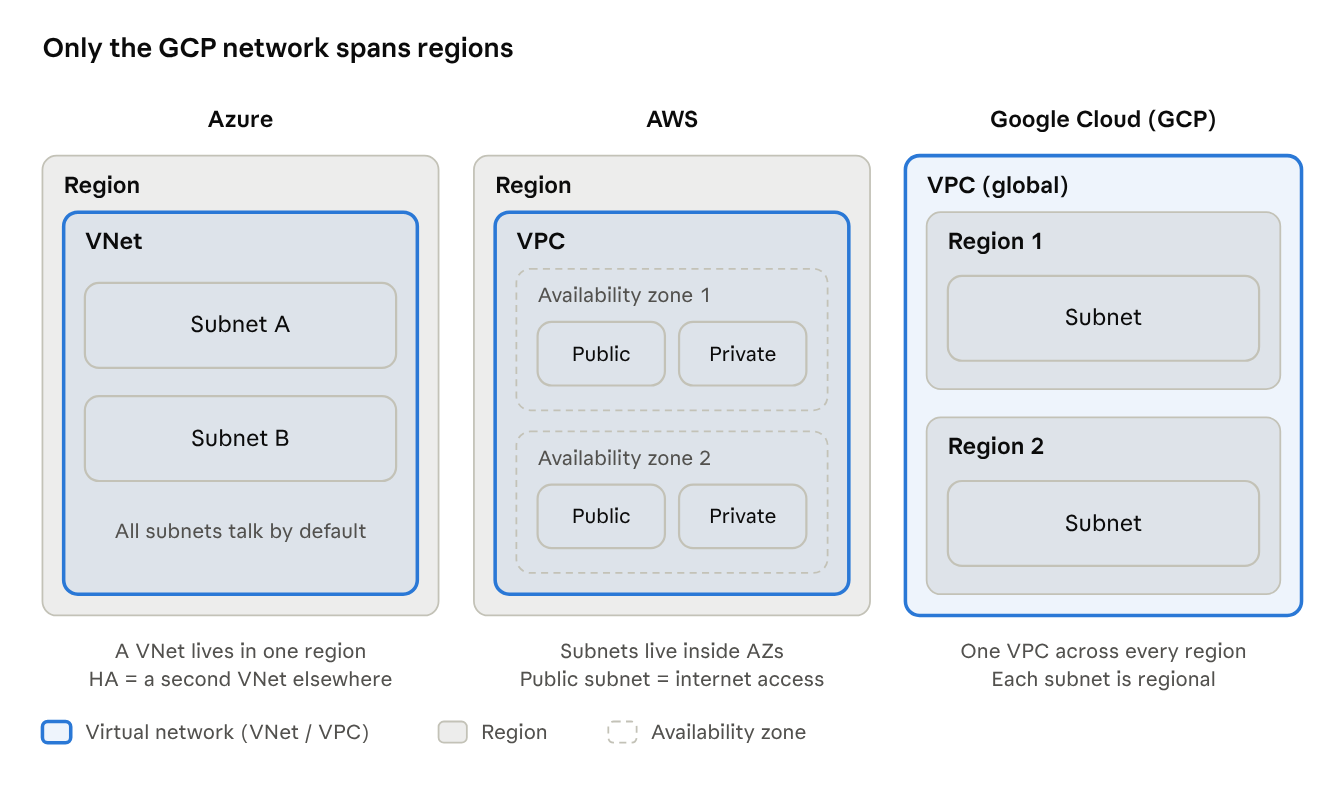
Read the nesting: in Azure and AWS the region holds the network, while in GCP the network holds the regions.
3. Peering
- All three providers support peering between virtual networks (Azure VNet peering, AWS VPC peering, GCP VPC peering).
- Peering is not transitive on any of the three.
- If A ↔ B and B ↔ C are peered, A and C cannot communicate until you add an A ↔ C peering.
- Full-mesh peering doesn’t scale: each new network needs a peering to every existing one, which quickly becomes hard to manage.
- The fix is a hub-and-spoke design: each network connects once to a central hub that routes between them, such as a firewall in an Azure hub VNet or an AWS Transit Gateway.
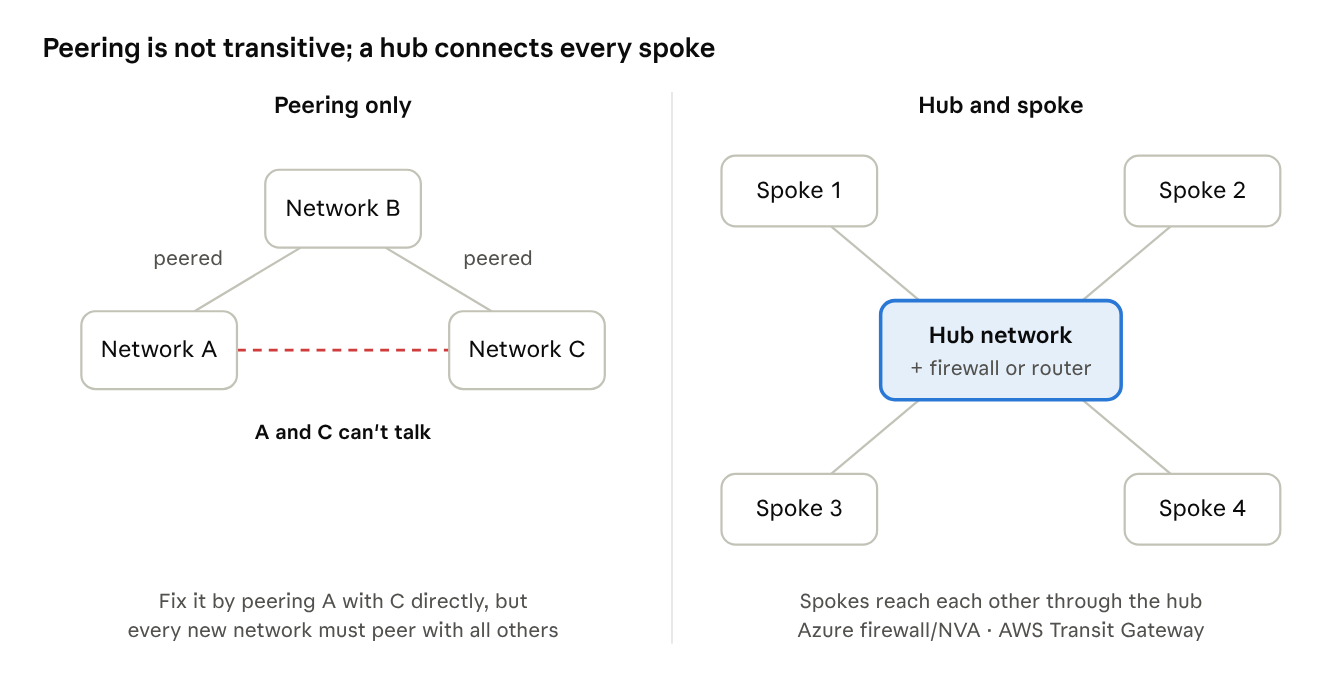
With peering alone, traffic only flows over a direct link. A hub that routes traffic lets every spoke reach every other through one connection each. In Azure that takes a firewall or NVA in the hub (or Virtual WAN); a gateway alone isn’t enough (section 4).
GCP specifics: projects and Shared VPC
- GCP introduces the project. A VPC belongs to a project.
- Subnets inside a VPC can communicate, but not with a VPC in another project — that requires VPC peering (still non-transitive).
- Example: Project 1 ↔ 2 and 2 ↔ 3 are peered → 1 and 3 still can’t talk without their own peering.
- Shared VPC: multiple projects use one central VPC owned by a host project, so connectivity is controlled and managed centrally. It’s shared ownership of one network, not routing between separate networks. To connect independently managed VPCs through a hub, use Network Connectivity Center.
4. Gateways and hub-and-spoke
Azure
- One VNet becomes the hub; spoke VNets connect to it via peering.
- The hub usually holds a VPN or ExpressRoute gateway that every spoke shares to reach on-premises. This is called gateway transit. The gateway does not route traffic between spokes: that needs an Azure Firewall or NVA in the hub with user-defined routes in each spoke, Azure Virtual WAN, or direct spoke peerings (for example, managed by Azure Virtual Network Manager).
- Gateways also connect to networks outside Azure:
- VPN Gateway — VPN connection to a VPN endpoint (e.g. your on-premises network).
- ExpressRoute Gateway — connects Azure to on-premises over a private ExpressRoute connection: private and redundant, over a third-party network, but not encrypted by default (section 7).
AWS
- Transit Gateway connects multiple VPCs within a region and lets traffic flow between them.
- Across regions, inter-region peering connects Transit Gateways together.
- Virtual private gateway — VPN connectivity to a remote network.
- Direct Connect — a private, high-bandwidth, dedicated connection between on-premises and AWS. A Direct Connect gateway lets it reach virtual private gateways or Transit Gateways in many regions (section 7).
- Ordered through a partner (hosted connection), or directly at a Direct Connect location (dedicated connection).
GCP
- Cloud VPN — secure connectivity to on-premises over the public internet.
- Cloud Interconnect — a connection over a private dedicated circuit (GCP’s equivalent of ExpressRoute / Direct Connect). Private, but not encrypted by default (section 7).
5. Hybrid connectivity — rules that apply everywhere
- All three use BGP (Border Gateway Protocol) to manage routing between on-premises and cloud networks.
- No overlapping subnets if you plan to use peering or connect to on-premises — plan IP address spaces up front.
- Hybrid connections aren’t only for on-premises: they can also link cloud providers to each other, enabling a true multi-cloud strategy with private connectivity between them.
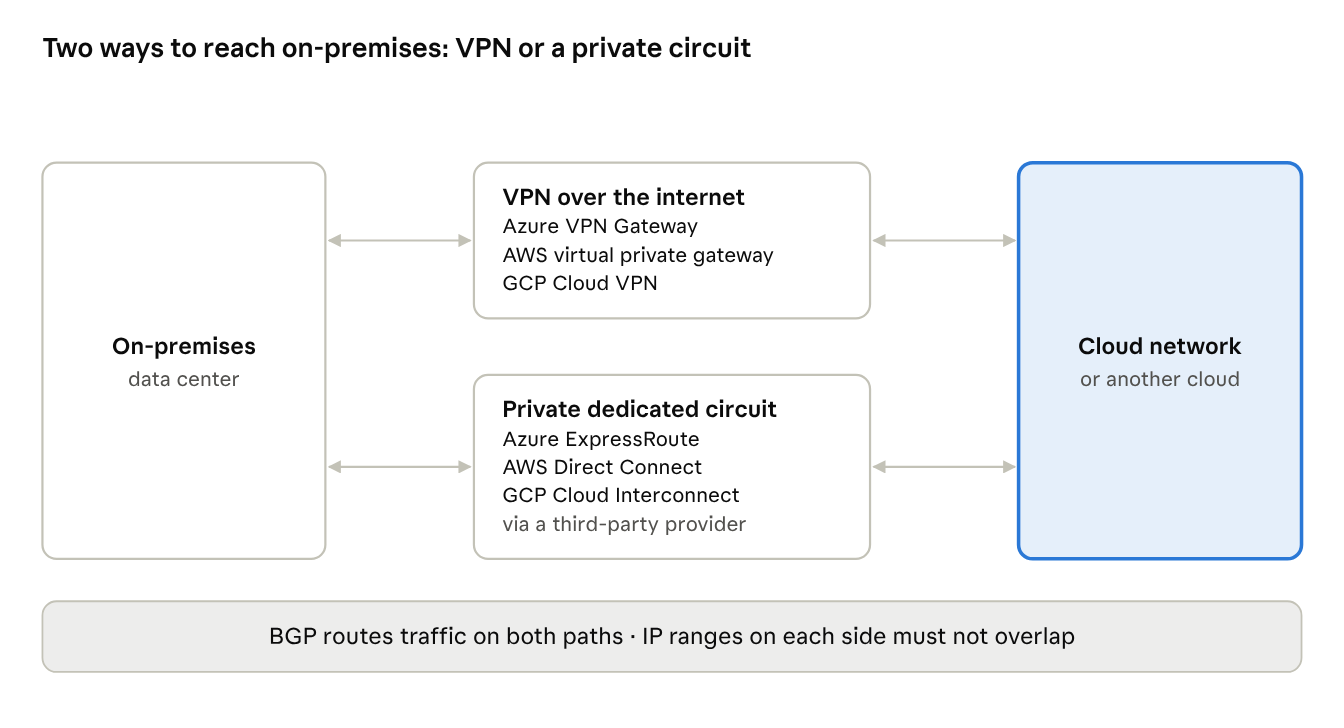
Every provider offers both paths: an encrypted VPN over the public internet, or a private dedicated circuit through a third-party provider. Only the VPN is encrypted by default.
6. Load balancing
- Load balancing distributes connections across multiple instances of a service.
- It improves availability and performance (spreads the workload).
Azure
| Service | Type | What it does |
|---|---|---|
| Azure Load Balancer | Protocol level (layer 4) | Distributes connections at the network/transport level |
| Application Gateway | Application level (layer 7) | Extends load balancing with application-aware routing |
| Traffic Manager | DNS-based | Uses name-to-IP resolution to distribute connections by rules you define |
| Front Door | Global | SSL offloading; routes traffic to the closest resource based on your rules |
AWS
| Service | Type | What it does |
|---|---|---|
| Network Load Balancer | Transport / TLS layer (layer 4) | Distributes connections at the transport layer |
| Application Load Balancer | Application layer (layer 7) | Routing decisions at the app layer, e.g. path-based routing |
| Route 53 | DNS-based | Routes by rules including health checks, geography and latency |
GCP
GCP organizes load balancers by where the client is:
- Internal load balancer — clients are inside Google Cloud.
- Regional or cross-region: the internal Application Load Balancer and internal proxy Network Load Balancer support a cross-region mode with backends in several regions. The internal passthrough Network Load Balancer is regional.
- Either TCP/UDP (passthrough) or a proxy using HTTP/HTTPS.
- External load balancer — clients come from the internet.
- Regional or global.
- Passthrough or proxy mode.
Designing for high availability: all three clouds
- A load balancer alone isn’t high availability. If every backend sits in one data center, the whole solution fails when that data center does.
- Build redundancy across regions or geographies, and combine global, regional, internal and external load balancers as needed.
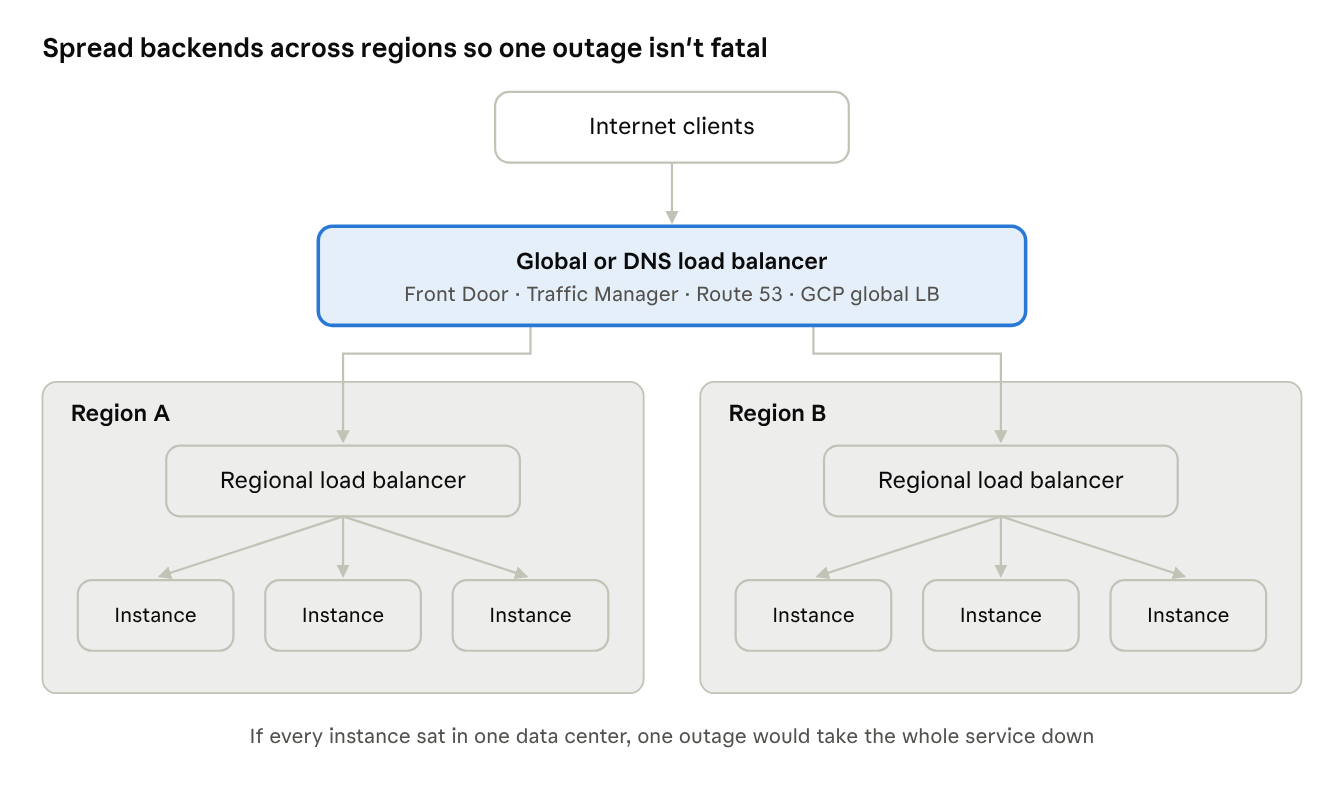
A global or DNS load balancer picks a region; a regional load balancer then spreads traffic across instances. If one region goes down, the other keeps serving.
The same two goals apply on every cloud: survive a zone failure inside a region, and survive a region failure. This table shows what to use for each.
| Goal | Azure | AWS | GCP |
|---|---|---|---|
| Survive a zone failure | Zone-redundant Standard Load Balancer or Application Gateway v2, with backends in several zones | ALB or NLB with two or more AZs enabled, with targets in each | Regional managed instance groups spread across zones, behind any load balancer |
| Survive a region failure | Front Door (HTTP) or Traffic Manager (DNS) across regions, or a cross-region (global) Load Balancer for layer 4 | Route 53 failover or latency routing with health checks, or AWS Global Accelerator | Global external Application Load Balancer with backends in several regions |
| Detect failures | Load balancer and Application Gateway health probes, Front Door origin health probes | Target group health checks, Route 53 health checks | Load balancer health checks, Cloud DNS health checks |
Azure
- Make the load balancer zone-redundant. A zone-redundant Standard Load Balancer serves traffic from one frontend IP address that survives a zone failure. For public load balancers, this is set on the public IP address.
- Spread the backends too. If every backend VM is in one zone, an outage there takes the app down even behind a zone-redundant load balancer.
- Application Gateway: use the Standard_v2 or WAF_v2 SKU with at least two instances to spread it across zones.
- Across regions: put Front Door (HTTP/HTTPS) or Traffic Manager (DNS) in front of copies of the app in two or more regions, with health probes so traffic only goes to healthy origins. For non-HTTP traffic, a cross-region Load Balancer links regional load balancers behind one global frontend.
- Use the Standard SKU. Basic load balancers have no SLA.
AWS
- Enable at least two AZs on every ALB and NLB, with targets in each. AWS creates a load balancer node in each enabled AZ.
- Cross-zone load balancing spreads requests evenly across targets in all enabled AZs, which matters when AZs have different numbers of targets.
- Let health checks steer traffic. Load balancers route only to healthy targets, and Route 53 health checks remove an AZ from the load balancer’s DNS if all its targets are unhealthy. Zonal shift lets you move traffic away from an impaired AZ yourself.
- Plan capacity for losing an AZ: run enough instances that the remaining AZs can carry the full load (often called static stability).
- Across regions: use Route 53 routing policies with health checks (such as failover or latency-based), or AWS Global Accelerator.
GCP
- Use regional managed instance groups so VMs are spread across zones automatically.
- Global external Application Load Balancer: one anycast IP address in front of backends in several regions. Traffic goes to the nearest healthy region and moves elsewhere if a region fails.
- Internal traffic: a cross-region internal Application Load Balancer fails over to backends in another region if one region is down.
- Protect against load balancer outages: for critical apps, Cloud DNS health checks can fail over from a global external Application Load Balancer to regional external Application Load Balancers in other regions.
- Regional passthrough Network Load Balancers support failover backends, such as an instance group in another zone.
Part 2: Enterprise networking architecture
Sections 7–15 go beyond the video, for engineers designing production and hybrid networks: private circuits, security, private service access, NAT, DNS, IP planning, routing and resilience.
7. Private connectivity deep dive
This section goes deeper on the private dedicated circuit path. It’s based on Megaport’s Comparing Private Connectivity of AWS, Microsoft Azure, and Google Cloud (October 2020), with speeds and limits re-checked against each provider’s documentation in November 2026.
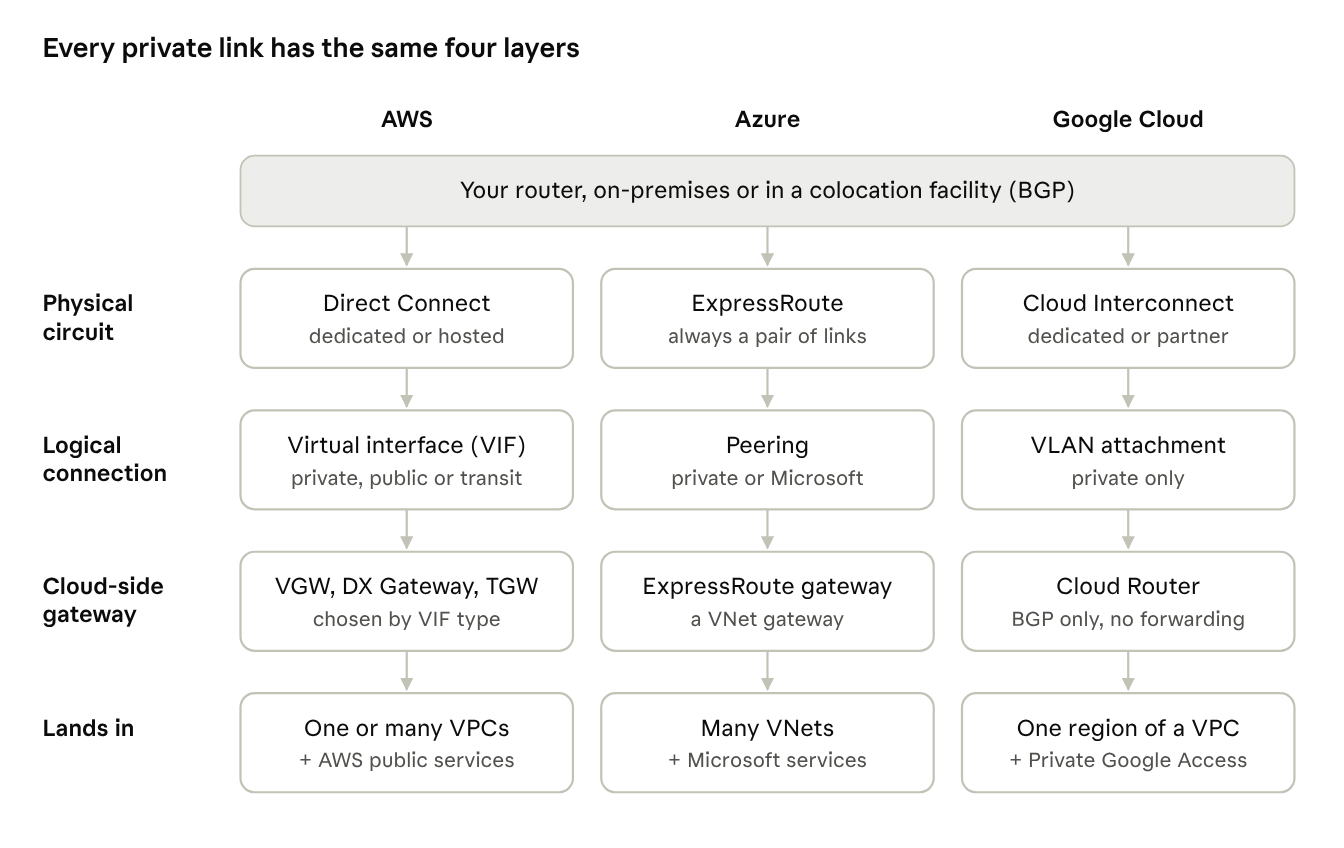
Read each column top to bottom: your router runs BGP over a physical circuit, a logical connection rides on that circuit, and a cloud-side gateway hands the traffic to your networks.
Two ways to buy a circuit
| Provider | Own the port (dedicated) | Through a partner (hosted) |
|---|---|---|
| AWS | Dedicated Connection: 1, 10, 100 or 400 Gbps port | Hosted Connection: 50 Mbps to 25 Gbps |
| Azure | ExpressRoute Direct: 10 or 100 Gbps port pair, split into circuits | Partner circuit: 50 Mbps to 10 Gbps |
| GCP | Dedicated Interconnect: one connection of 1 to 8 circuits, all 10, 100 or 400 Gbps (up to 3.2 Tbps). Each VLAN attachment carries 50 Mbps to 400 Gbps | Partner Interconnect: 50 Mbps to 50 Gbps per VLAN attachment |
- Dedicated: the provider issues an LOA-CFA (Letter of Authorization and Connecting Facility Assignment). You order the cross-connect from your equipment to theirs in the colocation facility.
- Partner: a service provider already has links into the cloud and provisions capacity for you. This is the “third-party provider” the video mentions, and it’s the usual route if you aren’t in a facility where the cloud provider is present.
- AWS hosted VIFs: the account that owns a circuit can provision a virtual interface for another account. All VIFs on that connection share its bandwidth.
The logical layer
- AWS virtual interfaces (VIFs):
- Private VIF — reaches VPCs over private IPs, through a virtual private gateway (one VPC) or a Direct Connect Gateway (many VPCs).
- Transit VIF — reaches VPCs through a Transit Gateway associated with a Direct Connect Gateway.
- Public VIF — reaches AWS public services (such as S3 and DynamoDB) over public IPs. It attaches to no gateway.
- Azure peerings:
- Private peering — reaches your VNets. BGP runs between your routers and Microsoft Enterprise Edge routers (MSEEs) at the peering location you chose.
- Microsoft peering — reaches public Azure services (such as Blob Storage) and Microsoft 365. You must create route filters before any routes arrive, and Microsoft 365 routes need Microsoft’s approval.
- GCP VLAN attachments:
- Each attachment connects to one region of one VPC, and the link is private only.
- To reach Google APIs (such as Cloud Storage) over the link, enable Private Google Access. Google Workspace isn’t reachable this way: use the internet or an internet exchange.
- Dedicated Interconnect uses IPv4 link-local addresses (169.254.0.0/16) for BGP peers and LACP, even on a single circuit.
Cloud-side gateways
| Provider | Gateway | What it connects |
|---|---|---|
| AWS | Virtual private gateway (VGW) | One VPC. Reached directly, or through a Direct Connect Gateway (private VIF) |
| AWS | Direct Connect Gateway | A global object linking your VIFs to VGWs (private VIFs) or Transit Gateways (transit VIFs) in any region. It doesn’t route between the gateways attached to it |
| AWS | Transit Gateway | A regional hub for VPCs, VPNs and Direct Connect (through a Direct Connect Gateway and a transit VIF) |
| Azure | ExpressRoute (VNet) gateway | Many VNets per circuit in hub-and-spoke. Premium reaches VNets worldwide |
| GCP | Cloud Router | One region of a VPC. It runs the BGP sessions and programs the learned routes; Google’s network virtualization layer (Andromeda) forwards the packets |
Azure: redundancy and reach
- Every ExpressRoute circuit includes two links (primary and secondary) to two MSEEs. For maximum resiliency, Microsoft recommends a second circuit in a different peering location.
- The circuit SKU sets how far it reaches:
- Local: one or two Azure regions near the peering location, with data transfer included in the port price.
- Standard: all regions in the same geopolitical area.
- Premium: all Azure regions globally.
Private doesn’t mean encrypted
ExpressRoute, Direct Connect and Cloud Interconnect keep traffic off the public internet, but none of them encrypts it by default. If you need encryption in transit, add it:
| Azure | AWS | GCP | |
|---|---|---|---|
| Link encryption (MACsec) | ExpressRoute Direct ports only | Dedicated connections that support MACsec, at select locations | MACsec for Cloud Interconnect (Dedicated; Partner through your service provider) |
| End-to-end IPsec over the circuit | VPN gateway over ExpressRoute private peering, or VPN over ExpressRoute in Virtual WAN | Private IP Site-to-Site VPN over a transit VIF to a Transit Gateway | HA VPN over Cloud Interconnect |
- MACsec encrypts the physical link between your router and the cloud’s edge router. It doesn’t protect traffic beyond that link.
- IPsec (or TLS in the application) encrypts end to end, at the cost of extra gateways and tunnel throughput limits.
- Keep four questions separate: is the path private, are the peers authenticated, is the traffic encrypted, and is routing isolated between environments?
- 400 Gbps is now available for AWS Dedicated Connections (since July 2024, at select locations) and Google Dedicated Interconnect.
- AWS hosted connections now go up to 25 Gbps (the article lists 10 Gbps).
- AWS MACsec encryption is available on 10, 100 and 400 Gbps connections at select locations.
- Google Cross-Cloud Interconnect provides private links from Google Cloud to other clouds, including a partner-managed version for AWS. This covers the multi-cloud scenario from section 5.
- Naming: the article calls Dedicated Interconnect “GCP Direct Connect”, but that’s a nickname, not Google’s term. G Suite is now Google Workspace.
8. Network security
The video says you’re still responsible for securing the network. In practice, that means writing firewall rules in each provider’s own model.
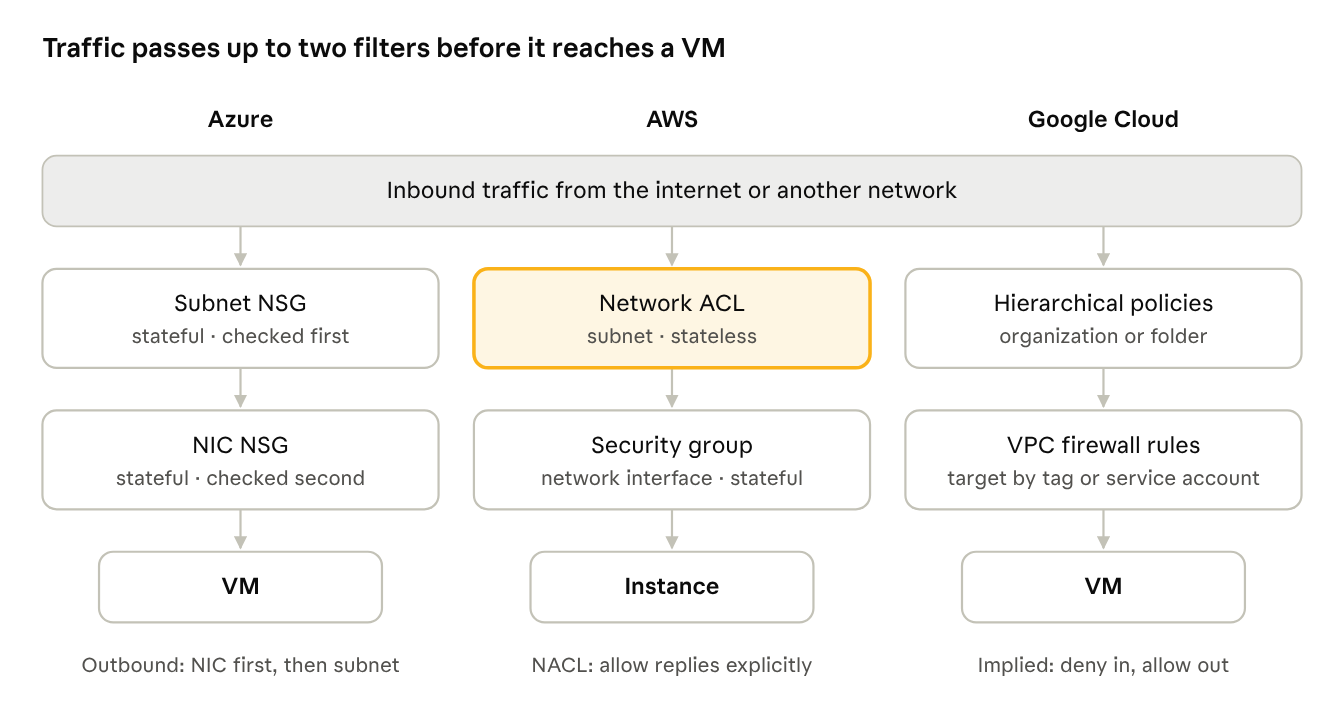
Read each column from the top: inbound traffic passes the outer filter, then the inner one, before it reaches the VM. Outbound traffic passes the same layers in reverse.
| Azure | AWS | GCP | |
|---|---|---|---|
| Main control | Network security group (NSG) | Security group + network ACL (NACL) | VPC firewall rules + firewall policies |
| Attached to | A subnet, a network interface (NIC), or both | Security group: network interface. NACL: subnet | The VPC network. Rules target VMs by network tag or service account |
| Stateful? | Yes | Security group: yes. NACL: no | Yes |
| Rule order | Priority 100–4096, lowest number first. First match wins | Security group: every rule checked, allow rules only. NACL: lowest rule number first, first match wins | Lower number = higher priority. At a tie, deny beats allow |
| Defaults | Built-in rules allow traffic within the VNet and from Azure Load Balancer, deny all other inbound, and allow outbound | New security groups allow all outbound and no inbound. The VPC’s default security group also allows inbound traffic from its own members. The default NACL allows everything | Implied rules deny all ingress and allow all egress. The auto-created default network adds rules for internal traffic, SSH, RDP and ping |
- Stateful vs. stateless: a stateful filter remembers each connection and lets the reply back in automatically. A stateless filter (the AWS NACL) checks every packet on its own, so you must also allow the return traffic, usually on high-numbered ephemeral ports.
- Azure evaluation order: for inbound traffic the subnet’s NSG is checked first, then the NIC’s. For outbound it’s the reverse. Traffic must pass both, and rule changes only affect new connections.
- Azure’s default rules can’t be deleted, only overridden with higher-priority rules.
- Target by role, not by IP address: Azure application security groups, AWS security groups that reference other security groups, and GCP network tags or service accounts.
- Managed firewalls add central inspection beyond basic rules: Azure Firewall, AWS Network Firewall and Google Cloud NGFW.
9. Private access to managed services
Managed services such as storage and databases have public endpoints by default. Private access lets your network reach them on private IP addresses instead. It connects you to one service, whereas peering connects whole networks.
| Azure | AWS | GCP | |
|---|---|---|---|
| Private IP for a service, inside your network | Private endpoint (Azure Private Link) | Interface VPC endpoint (AWS PrivateLink) | Private Service Connect endpoint |
| Lighter-weight option | Service endpoint: you still connect to the service’s public endpoint, but over the Azure backbone, and the service can limit access to your subnets | Gateway endpoint for S3 and DynamoDB: a route-table entry with no extra charge | Private Google Access: VMs without external IPs can reach Google APIs |
| Publish your own service privately | Private Link service behind a Standard Load Balancer | Endpoint service behind a Network Load Balancer | Published service through Private Service Connect |
- Reaching services from on-premises: private endpoints, interface endpoints and Private Service Connect endpoints all work over your VPN or private circuit. AWS gateway endpoints only serve traffic from inside the VPC.
- Turn off the public endpoint: once a service has a private endpoint, you can disable its public one.
- DNS is the usual catch: the service’s normal hostname must resolve to the private IP, including from on-premises. See section 11.
- AWS cost tip: sending S3 and DynamoDB traffic through a free gateway endpoint instead of a NAT gateway cuts the NAT bill.
10. Internet access and NAT
Resources with only private IPs often still need the internet, for software updates or external APIs. A NAT gateway gives them outbound-only access: they can start connections, but nothing on the internet can start a connection to them.
| Azure | AWS | GCP | |
|---|---|---|---|
| Two-way internet access | Public IP on the VM, or a load balancer | Internet gateway, with the resource in a public subnet | External IP on the VM |
| Outbound-only access | NAT Gateway, or load balancer outbound rules | NAT gateway in a public subnet. Private subnets route 0.0.0.0/0 to it. Egress-only internet gateway for IPv6 | Cloud NAT, a software-defined service with no proxy VMs |
| Out of the box | New VNets (API versions released after 31 March 2026) use private subnets: no internet access until you add an outbound method. Existing VNets keep default outbound access | Private subnets have no internet route | Firewall allows egress, but a VM needs an external IP or Cloud NAT to reach the internet |
- Fixed outbound IPs: NAT gives you a small, stable set of public IPs, which is handy when a partner allow-lists your addresses.
- AWS high availability: a NAT gateway sits in one AZ, so production setups usually deploy one per AZ.
- Cost: NAT gateways are billed by the hour and for the data they process. Send traffic for the provider’s own services through private endpoints where you can (section 9).
- Correction to section 2: “Azure resources have internet access by default” now only holds for older VNets.
11. DNS
Every cloud network has a built-in DNS resolver and supports private zones: DNS records visible only to the networks you link them to. Hybrid setups need name lookups to work across the connection in both directions.
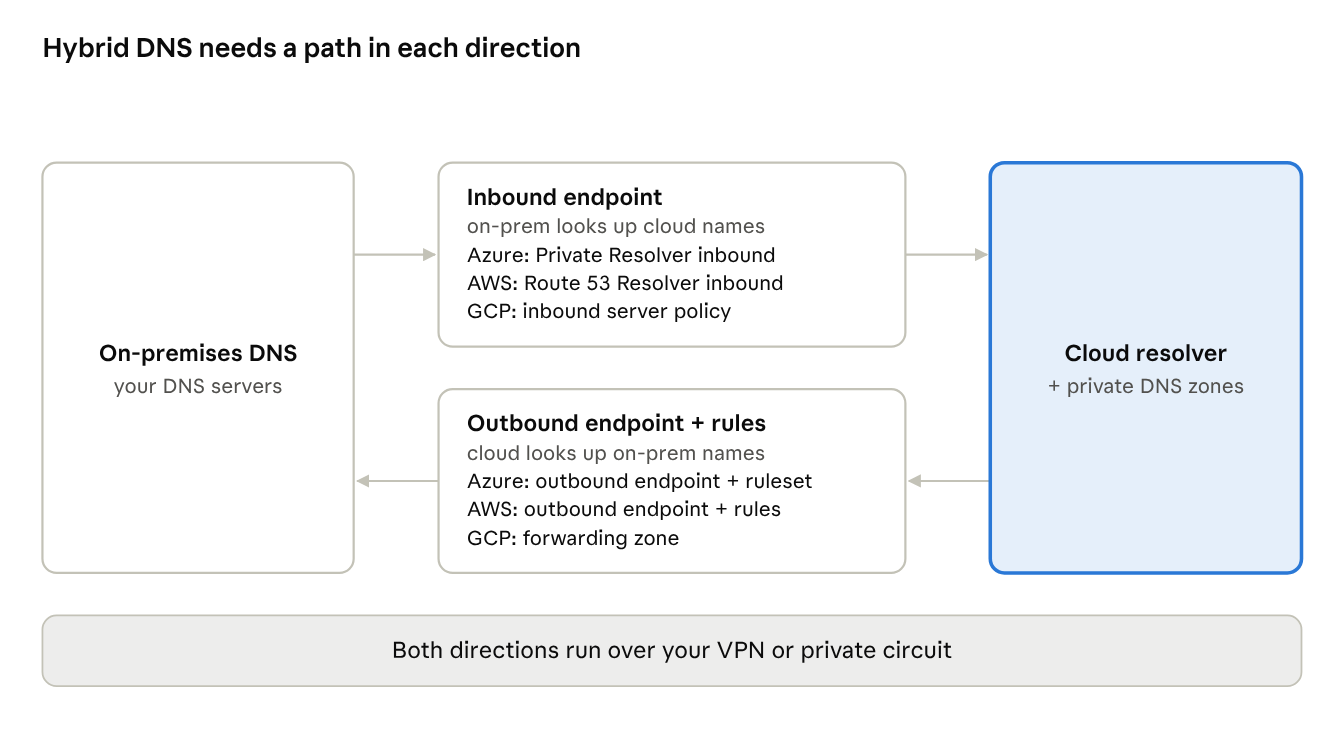
On-premises DNS servers forward cloud domain names to the inbound endpoint. The cloud resolver forwards on-premises names out through the outbound side.
| Azure | AWS | GCP | |
|---|---|---|---|
| Private zones | Azure Private DNS zones, linked to VNets | Route 53 private hosted zones, associated with VPCs | Cloud DNS private zones, visible to the VPCs you choose |
| Built-in resolver | Azure-provided DNS (168.63.129.16) | Route 53 Resolver (the “.2” address in each VPC) | Cloud DNS, through the metadata server (169.254.169.254) |
| On-premises looks up cloud names | DNS Private Resolver inbound endpoint | Resolver inbound endpoint | Inbound server policy |
| Cloud looks up on-premises names | DNS Private Resolver outbound endpoint + forwarding ruleset | Resolver outbound endpoint + forwarding rules | Forwarding zone (or an outbound server policy) |
- Private endpoints depend on DNS: a service’s normal hostname must resolve to its private endpoint IP. If on-premises DNS doesn’t forward to the cloud resolver, clients get the public IP and skip your private path.
- Resilience: put AWS Resolver endpoints in at least two subnets in different AZs.
- No more forwarder VMs: these managed endpoints replace the DNS server VMs teams used to run in the cloud just to forward queries.
12. IP address planning
Section 5 says IP ranges must never overlap. This is how to plan for that.
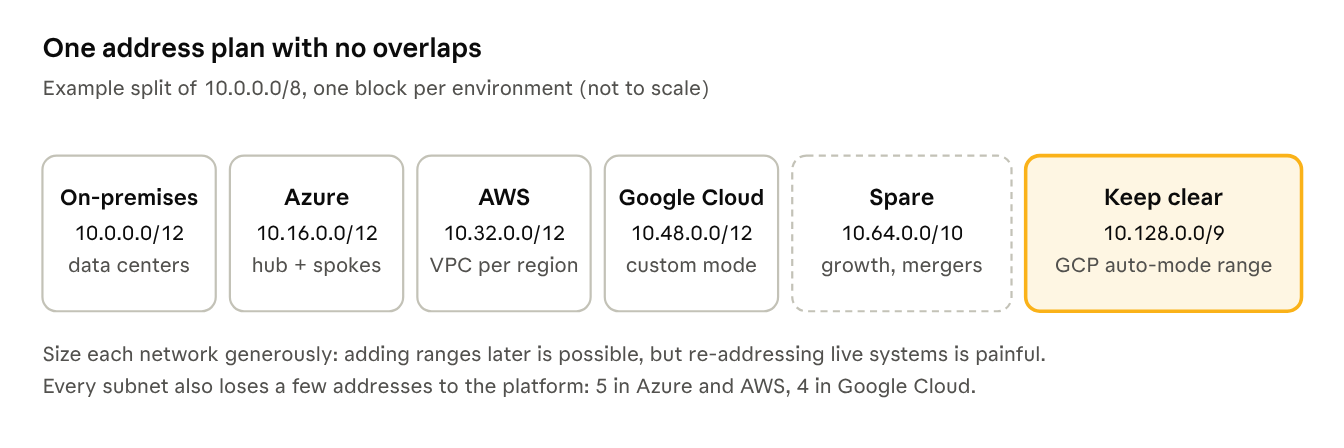
The example gives each environment its own block, leaves room to grow, and keeps Google’s auto-mode range free.
- Use private (RFC 1918) ranges: 10.0.0.0/8, 172.16.0.0/12 and 192.168.0.0/16.
- Plan everything together: on-premises, every cloud and every region, before you connect any of them. Fixing an overlap later means re-addressing live systems.
- Avoid special ranges, such as 169.254.0.0/16 (link-local, used for Interconnect BGP sessions and metadata servers) and Azure’s 168.63.129.16.
- Prefer custom-mode VPCs in GCP: auto mode creates a subnet in every region inside 10.128.0.0/9, which can clash with ranges used elsewhere.
| Azure | AWS | GCP | |
|---|---|---|---|
| Addresses reserved in every subnet | 5: the first four and the last | 5: network, router, DNS, one for future use, broadcast | 4: network, gateway, second-to-last, broadcast |
| Usable addresses in a /24 | 251 | 251 | 252 |
Worked example
| Block | Range | Example use |
|---|---|---|
| On-premises | 10.0.0.0/12 | Existing data centers and offices |
| Azure | 10.16.0.0/12 | Hub VNet 10.16.0.0/22; spoke VNets 10.17.0.0/16, 10.18.0.0/16 |
| AWS | 10.32.0.0/12 | One VPC per region: 10.32.0.0/16, 10.33.0.0/16 |
| GCP | 10.48.0.0/12 | Custom-mode VPC with regional subnets 10.48.0.0/20, 10.48.16.0/20 |
| Spare | 10.64.0.0/10 | New regions, growth, acquisitions |
| Keep clear | 10.128.0.0/9 | Google’s auto-mode range |
13. How routing works across Azure, AWS and GCP
All three clouds fill their route tables from the same three sources: routes the platform creates, static routes you add, and routes learned over BGP. They differ in where those tables live and how they break ties.
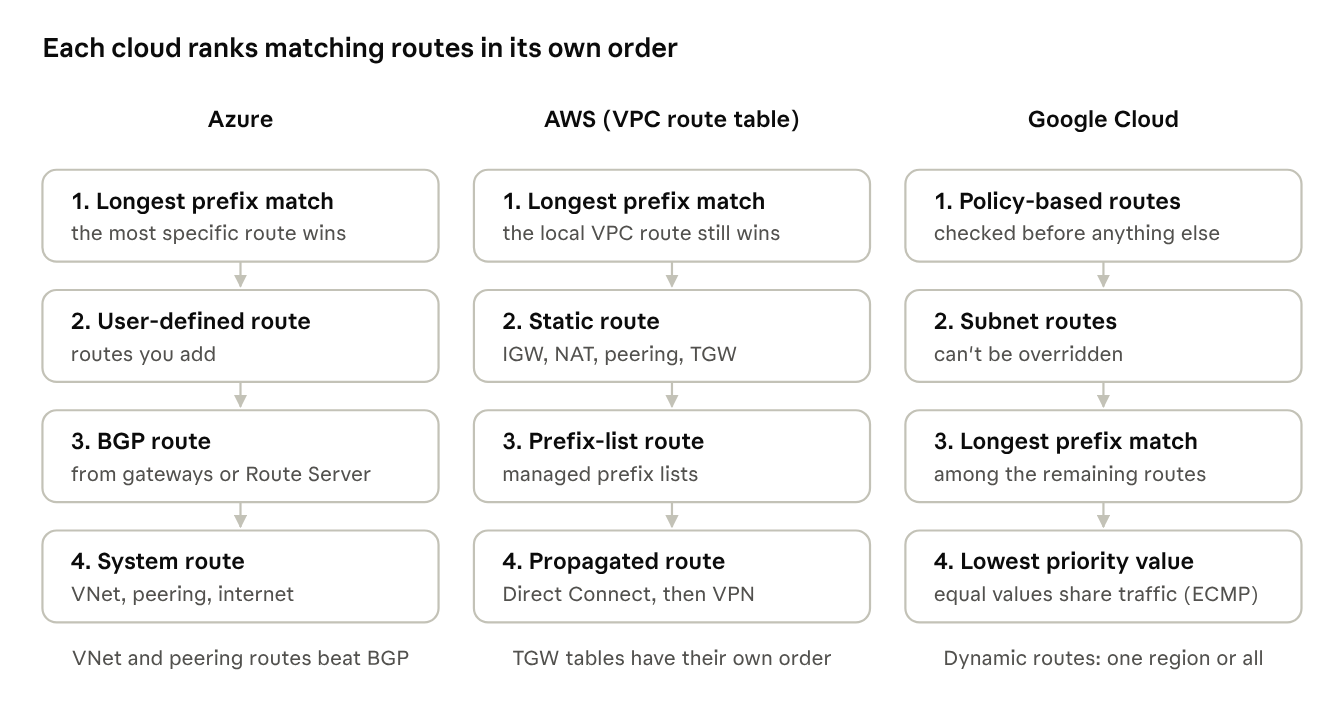
Read each column top to bottom: when several routes match a packet, the cloud works down its list until one wins.
| Azure | AWS | GCP | |
|---|---|---|---|
| Where routes live | Each subnet’s effective routes: system routes plus an optional route table of user-defined routes (UDRs) | A route table per subnet in the VPC, plus separate route tables inside each Transit Gateway | One route table for the whole VPC network. Routes can be scoped to regions or network tags |
| Static routes you add | User-defined routes, for example to send traffic through a firewall | Static routes in VPC or Transit Gateway route tables | Static routes, each with a priority |
| Routes learned over BGP | From VPN and ExpressRoute gateways or Azure Route Server. Can be turned off per route table (“propagate gateway routes”) | From a virtual private gateway when route propagation is on, or propagated into Transit Gateway route tables | Learned by Cloud Router and applied to one region or all, depending on the VPC’s dynamic routing mode |
| Tie-break for the same prefix | UDR, then BGP, then system routes. VNet and peering system routes still beat BGP | VPC route table: local route first, then static, prefix-list and propagated routes (Direct Connect before VPN). Transit Gateway route tables use their own order (below) | Policy-based routes, then subnet routes, then the most specific custom route with the lowest priority value |
| Equal paths | ECMP across up to four ExpressRoute circuits | Transit Gateway ECMP across Direct Connect gateway attachments with an identical prefix and AS_PATH | ECMP across next hops with equal priority |
- AWS makes three separate decisions. First, the VPC subnet’s route table picks a next hop, such as a Transit Gateway. Second, the Transit Gateway’s route table picks an attachment: the most specific prefix first, then static routes, prefix-list routes, and routes propagated from VPCs, Direct Connect gateways, Connect attachments, VPNs and peering, in that order. Third, for traffic to on-premises, BGP attributes on your advertisements choose between Direct Connect paths (section 14).
- AWS local route: if a propagated route overlaps the VPC’s own range, the local route wins even when the propagated route is more specific.
- GCP dynamic routing mode: in regional mode, routes a Cloud Router learns apply only in its own region. In global mode they apply in every region, with a region-to-region cost added. Workloads in other regions only reach on-premises through that Cloud Router in global mode.
14. Connected isn’t routed: BGP and routing policy
A circuit being up doesn’t mean traffic flows. For a prefix to work, it has to be advertised, accepted, installed and preferred, in both directions. Most “it’s connected but nothing works” problems trace back to one of these steps:
- Advertised: the source sends the prefix. An AWS Direct Connect gateway only advertises the allowed prefixes you list for each Transit Gateway association. A GCP Cloud Router advertises its subnets by default, or only the custom ranges you set.
- Accepted: filters, route policies and prefix limits on the receiving side let it in. Azure Microsoft peering needs a route filter before any routes arrive.
- Installed: the route reaches the route table the traffic actually uses (section 13). An Azure route table with gateway route propagation turned off won’t get it.
- Preferred: no more specific or higher-priority route wins instead.
- Symmetric, where it matters: stateful firewalls, NAT and some inspection services need return traffic on the same path. Plain routing tolerates asymmetric paths, so make paths symmetric wherever a stateful device sits in them.
Who controls which direction
| Azure | AWS | GCP | |
|---|---|---|---|
| Cloud to on-premises: what decides | Connection weight on the ExpressRoute gateway connection (checked first), then the AS_PATH length of your advertisements | Local-preference communities on your advertisements (7224:7100 low, 7224:7200 medium, 7224:7300 high), checked before AS_PATH length | The MED on your advertisements (lower wins). Check the VPC’s best path selection mode (legacy is the default) before relying on AS_PATH prepending |
| On-premises to cloud: what you receive | The same VNet prefixes on every link. You choose a path with local preference or prepending toward your core | The allowed prefixes, with the Direct Connect gateway ASN in the AS_PATH | Subnet routes with a MED set per BGP session (base priority). BGP route policies can also prepend the AS_PATH |
| Multipath | ECMP when advertisements are identical across circuits | ECMP across VIFs with equal AS_PATH length and attributes | ECMP across sessions with equal priority |
- Match both directions. If one team sets cloud-side preferences (such as Azure connection weight) and another sets on-premises prepending, write down the mapping and check it after every change.
- Understand MED propagation. MED is a non-transitive BGP attribute. It can be advertised to a directly connected neighboring AS but is generally not propagated to additional external ASes. If your enterprise core uses a separate AS, translate the desired routing preference into local preference, communities or other appropriate policy at the edge.
- Use BFD where it’s supported, and check the timers. AWS Direct Connect supports a minimum interval of 300 ms with a detection multiplier of 3, providing approximately 900 ms failure detection. Azure ExpressRoute supports BFD, but end-to-end convergence can take longer than BFD detection. Google Cloud Router supports BFD on supported Interconnect VLAN attachments (not HA VPN), with a minimum interval of 1,000 ms and a detection multiplier of 5, providing approximately 5 seconds of detection time. Without BFD, failures that do not trigger an immediate interface-down or other session-reset event may remain undetected until the BGP hold timer expires. Always validate actual traffic convergence.
- Test failover in both directions, and confirm traffic moves back when the link returns.
15. Resilient hybrid connectivity
Redundant links only help if they don’t fail together. Trace each path end to end and make sure the two paths share none of these:
- Routers, including their power and line cards.
- Ports and optics on each router.
- Cross-connects or partner ports, for example separate Equinix Fabric ports for each path.
- The colocation facility, or the provider’s location or metro.
- The cloud’s edge devices at that location.
- The cloud region that terminates the connection.
| Azure | AWS | GCP | |
|---|---|---|---|
| Built-in redundancy | Each ExpressRoute circuit has two links to two Microsoft edge routers | None per connection: you order more | None per connection: you order more |
| Recommended for critical workloads | Two circuits in two different peering locations, each using both links | Maximum resiliency: separate connections on separate devices in more than one location (99.99% SLA) | 99.99%: four connections, two in each of two metros, in different edge availability domains, with Cloud Routers in at least two regions |
| Lower tier | One circuit in one peering location | High resiliency: one connection in each of two locations (99.9% SLA) | 99.9%: two connections in one metro, in different edge availability domains |
- Size each path to carry the full load alone, or a failover just moves the outage.
- Use the providers’ tools: the AWS Direct Connect Resiliency Toolkit includes failover testing, and Google’s interconnect connection groups help you build the 99.99% topology.
- A VPN over the internet adds a third, independent path, but only helps if it can carry your critical traffic.
Key takeaways
- Same building blocks, different names: VNet (Azure) vs. VPC (AWS, GCP).
- Scope is the big difference: Azure and AWS networks are regional; GCP’s VPC is global.
- AWS subnets live in availability zones and are either public or private.
- Peering is never transitive — use a hub that routes traffic: an Azure firewall or NVA, Virtual WAN, an AWS Transit Gateway, or GCP Network Connectivity Center. (GCP Shared VPC instead shares one network across projects.)
- Hybrid options line up: VPN Gateway / virtual private gateway / Cloud VPN for internet VPN; ExpressRoute / Direct Connect / Cloud Interconnect for private circuits.
- BGP everywhere, no overlapping IP ranges — plan address space early.
- Load balancers come in layer 4, layer 7, DNS and global flavors; real availability depends on spreading backends across locations.
- Private links stack four layers: physical circuit, then a logical connection (VIF, peering or VLAN attachment), then a cloud-side gateway, then your networks. Buy a dedicated port if you’re in the colocation facility; otherwise go through a partner.
- Secure in layers: NSGs, security groups and NACLs, and VPC firewall rules all filter traffic. Only the AWS NACL is stateless.
- Reach services privately, reach the internet deliberately: use private endpoints, PrivateLink or Private Service Connect for managed services, and NAT for outbound-only internet. New Azure VNets have no internet access until you add an outbound method.
- Plan DNS and IP space before connecting anything: forward DNS in both directions, and give every environment its own non-overlapping block.
- Private isn’t encrypted: add MACsec or IPsec over ExpressRoute, Direct Connect or Cloud Interconnect when you need encryption in transit.
- Connected isn’t routed: a prefix must be advertised, accepted, installed and preferred in both directions, and each cloud picks paths with a different setting (Azure connection weight, AWS local-preference communities, GCP MED).
- Remove shared failure domains: keep redundant paths on separate routers, ports, partner paths, facilities and cloud locations, and size each path for the full load.