When a BGP session flaps, the router has usually already told you why. Before you change timers, swap optics, or open a TAC case, look for two things: the reset reason the router recorded, and the FSM state the session reached before it died. Between them, those two facts rule out most causes in a couple of minutes.
A flapping session cycles between Established and a lower state, such as Idle or Active, over and over. Unless Graceful Restart is holding them as stale, the routes learned over that session are removed each time it drops, and the peer re-advertises its eligible routes each time it recovers. Depending on whether alternate paths exist and how fast the network converges, the result can be transient loss, black-holed traffic, suboptimal routing or churn that spreads to downstream routers.
How a BGP session lives and dies
BGP runs over a single TCP connection to port 179. The session ends when that connection fails, when nothing gets through it for longer than the hold time, when either side detects a protocol error, or when an external mechanism such as BFD declares the peer down. Brief packet loss on its own doesn’t reset a session, because TCP retransmits until the data gets through.
The states. A session moves through Idle, Connect/Active (setting up TCP), OpenSent and OpenConfirm (exchanging OPEN messages and capabilities), and finally Established. Connect means the router is actively trying to open the TCP connection. Active means that attempt failed and it is waiting to retry or for the peer to connect in. Despite the name, a session sitting in Active is not working.
Timers are negotiated, not matched. Each side proposes a hold time in its OPEN message, and both use the lower of the two. Only the hold time is negotiated. Each router picks its own keepalive interval, and RFC 4271 recommends one no greater than a third of the negotiated hold time. A mismatch alone therefore never drops a session. The exceptions: a proposed hold time of 1 or 2 seconds is illegal, and a router can be configured to reject anything below a minimum. Both cases fail with an OPEN error (Unacceptable Hold Time) and the session never comes up.
Cisco defaults are not the RFC value. RFC 4271 suggests a 90-second hold time, but Cisco platforms ship with 180 seconds:
| Platform | Keepalive (s) | Hold time (s) |
|---|---|---|
| Cisco IOS / IOS-XE | 60 |
180 |
| Cisco IOS-XR | 60 |
180 |
| Cisco NX-OS | 60 |
180 |
The two sides don’t need to match. If a peer outside your network proposes 90 seconds, both sides use 90. Check for timers set in neighbor templates or peer-groups, which override these defaults.
What the hold timer actually measures. In the Established state, every KEEPALIVE or UPDATE that arrives restarts the hold timer, so a busy session doesn’t depend on keepalives alone. Because everything shares one TCP stream, keepalives sit in the queue behind UPDATEs. If TCP stalls (retransmissions, a zero window, an MTU black hole), keepalives stop arriving even though the peer is sending them. That is why so many unrelated problems end up reported as Hold Timer Expired. One special case: if the negotiated hold time is 0, neither side sends keepalives and the hold timer never expires, so a dead peer is only noticed through TCP or BFD.
Bad UPDATEs no longer have to kill the session. Under the original rules, any malformed attribute tore the session down. RFC 7606 replaced that with graded responses. Most errors are handled as treat-as-withdraw, where the affected routes are dropped and the session stays up. Some, such as a bad optional attribute that doesn’t affect route selection, are handled by discarding just that attribute. A few, such as an UPDATE that can’t be parsed at all, still require a session reset. Older software without this behavior can still be reset by a corrupt attribute that started many hops away, and several real-world outages happened exactly this way.
Diagnose by where it dies
The furthest state a session reaches cuts the list of suspects down quickly. A session that never gets to Established has a configuration or reachability problem. One that gets there and then drops has a path, load or policy problem.
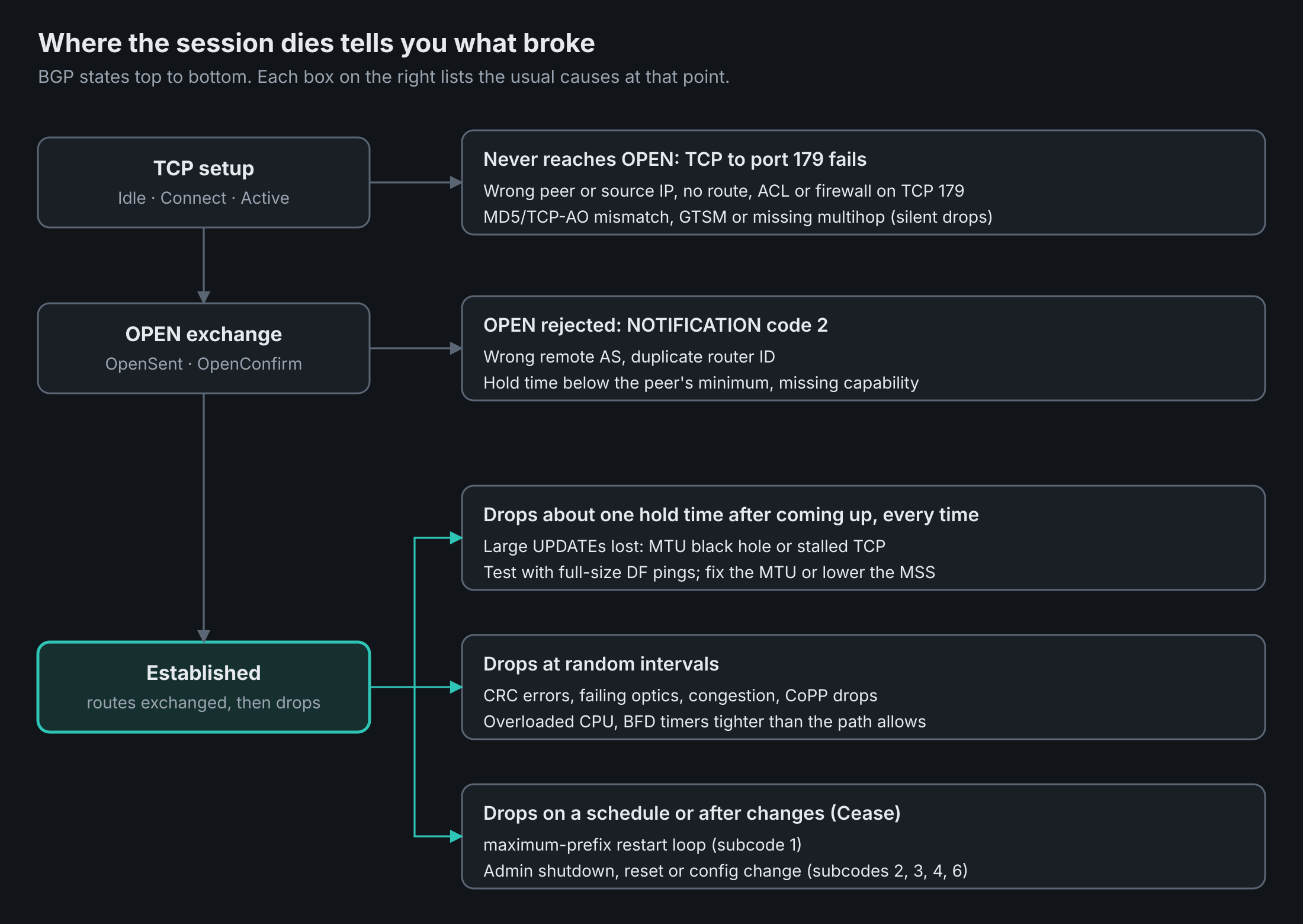
How long the session stays up matters as much as the state. A steady interval points to something deterministic, such as MTU or a restart timer. Random intervals point to the physical path or to load.
Decode the reset reason
The NOTIFICATION message carries an error code and subcode. Routers print it as text (“hold time expired”, “peer de-configured”). The table maps the common ones to what they really mean. Always note whether the NOTIFICATION was sent or received: it tells you which side detected the problem.
| Code / subcode | Name | What it usually means |
|---|---|---|
4 |
Hold Timer Expired | Nothing arrived for the full hold time. Link loss, congestion, CoPP drops, an MTU black hole, or a CPU-starved peer. The side that sent it was the one starved of messages. |
6 / 1 |
Cease: Maximum Number of Prefixes Reached | Peer sent more routes than your maximum-prefix allows. Common when a customer leaks a full table. |
6 / 2 |
Cease: Administrative Shutdown | Someone shut the neighbor. |
6 / 3 |
Cease: Peer De-configured | The neighbor was removed from the config. |
6 / 4 |
Cease: Administrative Reset | Someone (or some automation) ran a hard clear. |
6 / 5 |
Cease: Connection Rejected | Peer isn’t configured for you yet, or is refusing connections. |
6 / 6 |
Cease: Other Configuration Change | A config change that requires a reset, such as a new address family or changed capabilities. |
6 / 7 |
Cease: Connection Collision Resolution | Both sides opened TCP at once and one connection was dropped. Normal during setup; ignore it. |
6 / 8 |
Cease: Out of Resources | Peer ran out of memory or another resource. |
6 / 10 |
Cease: BFD Down | BFD declared the path dead and took BGP down with it. Supported on newer software only; older code just logs a BFD event. |
2 / 2 |
OPEN: Bad Peer AS | remote-as is wrong on one side. |
2 / 3 |
OPEN: Bad BGP Identifier | Invalid router ID, or one that duplicates another router in the same AS. RFC 6286 requires uniqueness only within an AS. |
2 / 6 |
OPEN: Unacceptable Hold Time | Proposed hold time is 1–2 s, or below the peer’s configured minimum. |
2 / 7 |
OPEN: Unsupported Capability | A capability one side requires is missing on the other. |
3 |
UPDATE Message Error | A malformed UPDATE. On software without RFC 7606, a corrupt attribute from far away can trigger it. |
5 |
Finite State Machine Error | A message arrived in a state where it isn’t allowed. Often a software bug. |
8 |
Send Hold Timer Expired | Your router couldn’t send anything for a long time because the peer stopped reading its TCP socket (RFC 9687). Your side must close the session and log the error. Sending the NOTIFICATION is optional, and it often can’t get through the blocked connection anyway. |
Codes 1–6 come from RFC 4271. The Cease subcodes come from RFC 4486, RFC 8538 and RFC 9384.
No NOTIFICATION at all usually means TCP itself died. Common causes are an interface going down (with fast external fallover), a TCP reset, or BFD on software that doesn’t send subcode 10.
The troubleshooting workflow
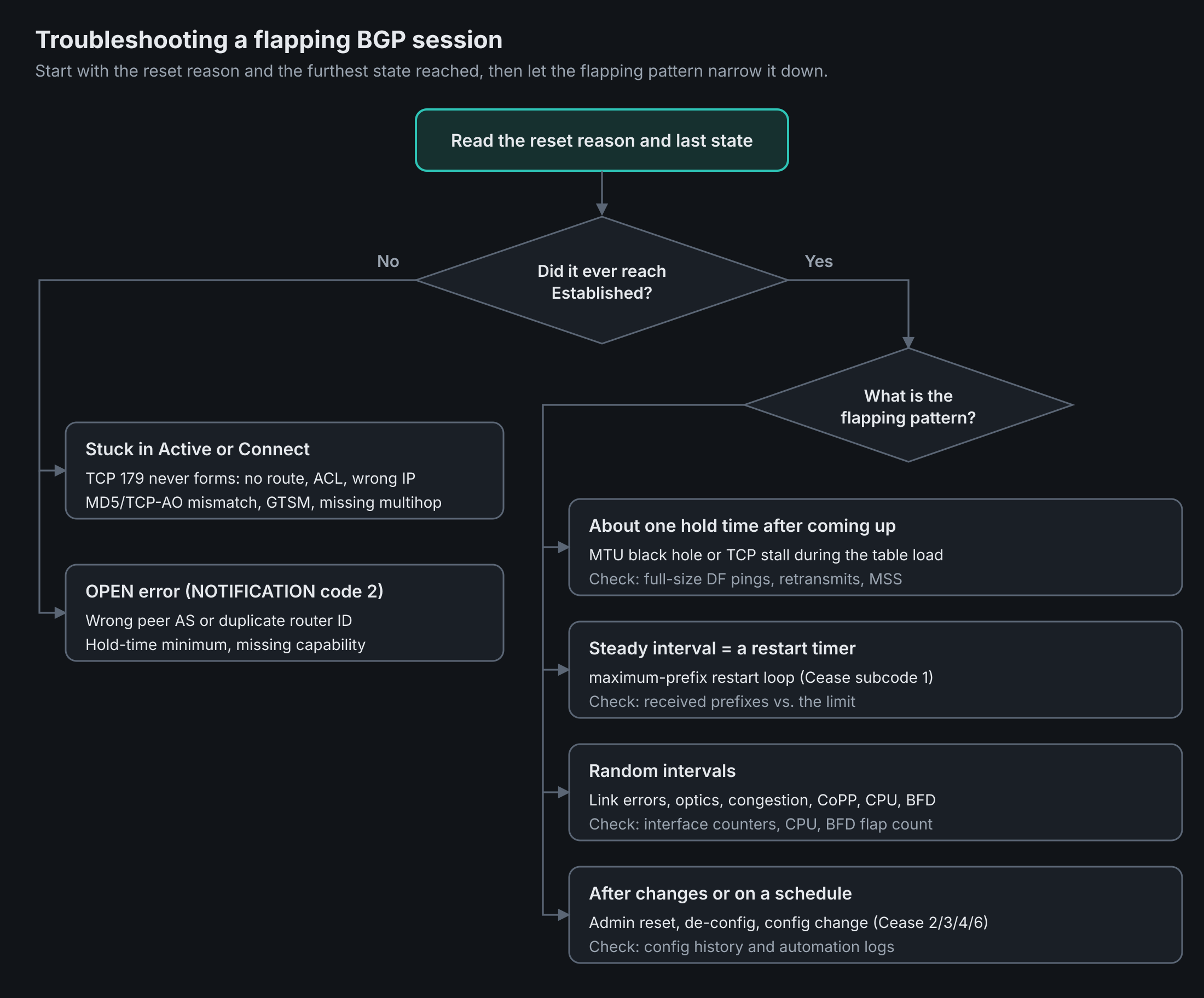
Work top to bottom. Each step either names the cause or rules out a whole class of causes. The examples use peer 192.0.2.1 and local loopback 198.51.100.1. Field names vary slightly between releases, so read the full output if a filter returns nothing.
1. Get the reset reason and the flap count
! Cisco IOS-XE
show ip bgp neighbors 192.0.2.1 | include BGP state|Last reset|Connections established
! Cisco NX-OS
show bgp ipv4 unicast neighbors 192.0.2.1 | egrep "BGP state|Last reset|Connections established"
! Cisco IOS-XR
show bgp neighbor 192.0.2.1 | include "BGP state|Last reset|Connections established"
Write down three things: the reason, whether the NOTIFICATION was sent or received, and how many times the session has dropped.
2. Analyze the BGP flapping pattern
Analyze the frequency, duration and recurrence of the session resets. Run show bgp summary a few times and watch the Up/Down column, then line up the flap times from the logs. A pattern helps separate deterministic failures from intermittent transport or control-plane instability:
| Flapping pattern | Investigate first |
|---|---|
Drops about one hold time after coming up, every time (every 3 minutes with Cisco’s default 180 s hold time) |
MTU or a TCP stall during the initial table transfer. ACLs, CoPP or one-way packet loss can look the same. |
| Steady interval that matches a configured restart timer (for example, every 30 minutes) | A maximum-prefix ... restart loop first, then automation or a recurring transport event |
| Random intervals | Physical-layer errors, congestion, CPU starvation, BFD |
| Same time every day, or during change windows | Scheduled automation, backups, recurring congestion, or someone resetting the session |
| Immediately after a BFD session goes down | BFD timers vs. the path, or a real forwarding failure underneath |
| Several neighbors drop at the same moment | Shared infrastructure or a control-plane problem on the router |
Treat the pattern as a diagnostic indicator, not a diagnosis. Timing alone doesn’t establish the root cause, so confirm it with the checks that follow.
3. Correlate with other events
! Cisco IOS-XE
show logging | include BGP|BFD|LINK|LINEPROTO|BADAUTH
! Cisco NX-OS
show logging logfile | egrep "BGP|BFD|ETHPORT"
Log lines that land in the same second as the flap usually point at the cause: an interface going down, BFD declaring the peer down, or a config change. On IOS-XE, bgp log-neighbor-changes must be on (it is by default on current releases). On NX-OS, configure log-neighbor-changes under router bgp.
Look across neighbors, not just at the one that is flapping. If several sessions, VRFs or cloud connections drop at the same moment, they probably share a failure domain, such as one physical circuit, one provider handoff or one line card. That is a transport problem, not several separate BGP problems.
4. Test the path the session actually uses
Ping from the same source address BGP uses, with full-size packets and the do-not-fragment bit set:
! Cisco IOS-XE
ping 192.0.2.1 source Loopback0 repeat 1000 size 1500 df-bit
! Cisco NX-OS (packet-size is the ICMP payload: 1472 + 28 = 1500)
ping 192.0.2.1 source 198.51.100.1 count 1000 packet-size 1472 df-bit
! Cisco IOS-XR
ping 192.0.2.1 source Loopback0 count 1000 size 1500 donnotfrag   (IOS-XR really spells it this way)
Small pings succeeding while full-size DF pings fail strongly suggests a path MTU limit, though size-based filtering by a firewall or policer looks the same. Occasional loss at every size points to congestion or a physical problem.
Testing from a laptop. A laptop on a segment that uses the same path (the same tunnel or provider link) is a useful supplemental check, but not a substitute for testing from the router. The laptop has its own source address, VRF, ACL and firewall policy, and its traffic may hash onto a different ECMP or port-channel path than the BGP session does. On both systems the size is the ICMP payload, so 1472 bytes plus 28 bytes of headers makes a 1500-byte packet. Lower the size until pings succeed to find the real path MTU.
Windows 11 (Command Prompt or PowerShell):
ping -f -l 1472 -n 1000 192.0.2.1macOS (Terminal):
ping -D -s 1472 -c 1000 192.0.2.1A laptop can also hint at whether something in the path is blocking TCP 179, a common reason a session is stuck in Active. A refused or reset connection means your packets reached a device that answered, which is expected because your laptop isn’t a configured neighbor. A timeout means something is silently dropping your traffic, often a firewall or ACL, though the router’s own control-plane protection can do the same. Either way, the result applies to the laptop’s path, not necessarily to the BGP peer’s.
Windows 11 (PowerShell):
Test-NetConnection 192.0.2.1 -Port 179macOS (Terminal):
nc -vz -G 5 192.0.2.1 1795. Check the route and forwarding path to the peer
Confirm the router reaches the peer through the interface and next hop you expect, in the right VRF. For iBGP between loopbacks, the route to the peer comes from the IGP. If it recurses through an unexpected path, or through BGP itself, the session inherits that path’s problems.
! Cisco IOS-XE
show ip route 192.0.2.1
show ip cef 192.0.2.1 detail
show ip route vrf CUSTOMER-A 192.0.2.1
show ip cef vrf CUSTOMER-A 192.0.2.1 detail
! Cisco NX-OS
show ip route 192.0.2.1 vrf CUSTOMER-A
show forwarding ipv4 route 192.0.2.1 vrf CUSTOMER-A
! Cisco IOS-XR
show route vrf CUSTOMER-A 192.0.2.1
show cef vrf CUSTOMER-A 192.0.2.1 detail
6. Check the interface, queues and optics
! Cisco IOS-XE
show interfaces TenGigabitEthernet0/0/0 | include errors|CRC|resets|carrier|drops
show interfaces transceiver detail
show policy-map interface TenGigabitEthernet0/0/0
show etherchannel summary
! Cisco NX-OS
show interface ethernet1/1 counters errors
show interface ethernet1/1 transceiver details
show policy-map interface ethernet1/1
show port-channel summary
! Cisco IOS-XR
show interfaces TenGigE0/0/0/0
show controllers TenGigE0/0/0/0 phy
show bundle
Rising CRC or input errors while the link stays up is the classic sign of a failing optic, a dirty fiber or a bad patch cord. Capture the current counters first, so you keep the evidence for the incident record, then clear them and watch whether they climb. Also check output drops and per-class queue drops in the QoS policy: egress congestion and microbursts can starve BGP without any errors showing. If the session runs over a port-channel, check each member link. One bad member only hurts the flows that hash onto it, which can include your BGP session and nothing else.
7. Look inside the TCP connection
Check the session’s negotiated max segment size and its retransmission counters. On IOS-XE they appear near the bottom of the neighbor output. On NX-OS and IOS-XR, look at the TCP connection itself:
! Cisco IOS-XE
show ip bgp neighbors 192.0.2.1 | include max data segment|retransmit
! Cisco NX-OS
show sockets connection tcp detail
! Cisco IOS-XR
show tcp brief
show tcp detail pcb <pcb-id-from-show-tcp-brief>
A large max segment size combined with climbing retransmissions points to an MTU problem. A zero receive window from the peer points to a peer that has stopped reading, often because its CPU is saturated.
8. Check the control plane
! Cisco IOS-XE
show processes cpu sorted 5sec | include BGP
show policy-map control-plane
! Cisco NX-OS
show processes cpu sort | include bgp
show policy-map interface control-plane
! Cisco IOS-XR
show lpts pifib hardware police location all | include BGP
If control-plane policing (CoPP on IOS-XE and NX-OS, LPTS on IOS-XR) is dropping BGP packets during bursts, keepalives are lost even though the link is clean.
9. Check BFD separately
! Cisco IOS-XE / NX-OS
show bfd neighbors details
! Cisco IOS-XR
show bfd session detail
If BFD flaps first and BGP follows within milliseconds, the cause is BFD or the path underneath it, not BGP. Compare the BFD flap count with the BGP flap count.
10. Confirm what changed
Compare config history (show archive config differences on IOS-XE, show accounting log on NX-OS) and your automation logs against the flap times. An automation job that runs a hard clear, or re-pushes a neighbor’s config, looks exactly like an unstable network.
Root causes in depth
MTU black holes: the session that dies every few minutes
The pattern: the session establishes, starts sending the table, then dies with Hold Timer Expired roughly one hold time later. Then it repeats. OPEN and KEEPALIVE messages are tiny, so they get through. Full-size UPDATE segments are silently dropped somewhere along the path: a tunnel, a provider link with a smaller MTU, or a firewall blocking the ICMP “fragmentation needed” messages that path MTU discovery depends on. TCP keeps retransmitting the large segment, the keepalives queue behind it, and the peer’s hold timer runs out.
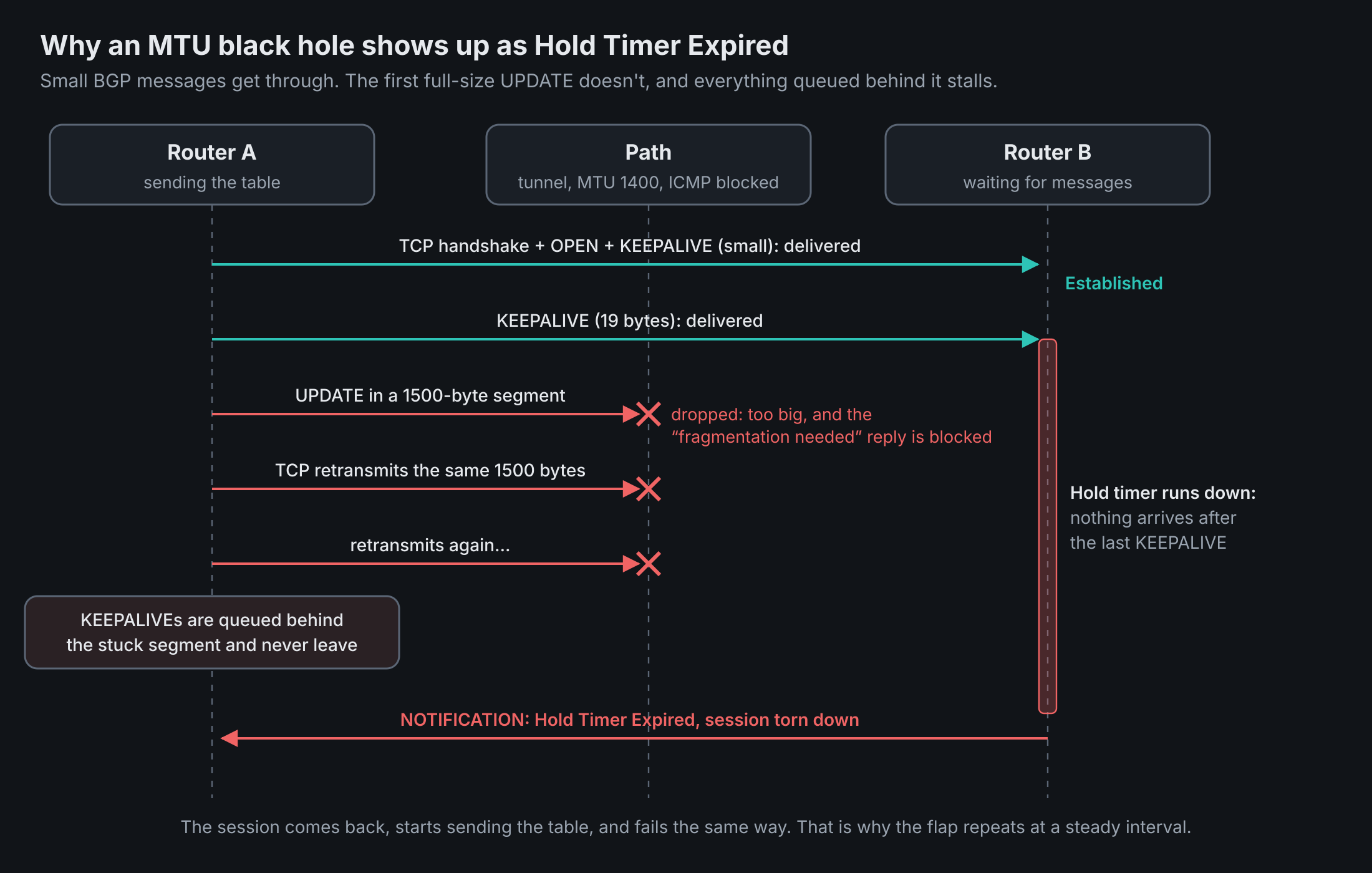
Confirm it: full-size DF pings fail while small ones pass, TCP retransmissions climb on the BGP connection, and the session’s max segment size is larger than the path can carry. Fix it: correct the MTU along the path, or make the BGP session use a smaller max segment size. Lowering the hold time doesn’t help.
MTU and MSS are different numbers. For IPv4, the advertised MSS is normally the MTU minus 40 bytes of fixed IP and TCP headers (RFC 6691). TCP options, such as MD5 authentication, don’t change the advertised value. Instead they reduce how much data fits in each segment actually sent:
| Path MTU (bytes) | Typical IPv4 TCP MSS (bytes) |
|---|---|
1500 |
1460 |
1400 |
1360 |
1300 |
1260 |
Make sure an MSS change applies to the router’s own BGP connection. On IOS-XE, the interface command ip tcp adjust-mss rewrites the MSS on TCP traffic passing through the router. It doesn’t affect sessions the router originates. For the router’s own sessions, rely on path MTU discovery for BGP (on by default on current releases) or the global ip tcp mss command. Check your platform’s documentation for the equivalent on NX-OS and IOS-XR.
Packet loss, congestion and control-plane policing
BGP has no special treatment on a congested link unless you give it some. Loss on a saturated interface, or CoPP/LPTS policers dropping bursts aimed at the CPU, can starve the session for a full hold time. Verify that BGP traffic is classified and marked correctly, commonly as CS6, and that QoS protects it end to end. Many Cisco platforms already mark their own routing-protocol traffic this way, but carrier networks may re-mark it. Size CoPP for the worst case: a full-table resync, not normal operation.
Physical layer
A failing optic, dirty connector or marginal fiber can corrupt frames for minutes while the link stays up. Each corrupted segment has to be retransmitted. Watch CRC counters, optical receive levels against the transceiver’s thresholds, and FEC-corrected and uncorrectable counters on high-speed links. On directly connected eBGP sessions, fast external fallover (on by default on Cisco IOS-XE) resets the session as soon as the local interface goes down. It only reacts to the local interface, though. On carrier Ethernet, MPLS handoffs and cloud exchange fabrics, a failure upstream can leave your interface up, so the session waits for the hold timer or BFD instead.
Overloaded routers
A router processing a full Internet table (more than 1 million IPv4 prefixes, plus IPv6) on undersized hardware can fall behind on keepalives during convergence. It can also stop reading from TCP altogether. The peer then sees a zero receive window. On software that supports RFC 9687, the peer closes the session with a Send Hold Timer Expired error, although the NOTIFICATION itself may never arrive. Check CPU and memory during the flap, not afterward. Consider filtering to a partial table or default route if the hardware can’t keep up.
Authentication (TCP-MD5 / TCP-AO)
A password mismatch doesn’t produce a BGP error. The TCP segments are dropped before BGP ever sees them, so the session sits in Active or Connect and the router logs an authentication failure. Changing the password on a live session is a trap, because what happens next depends on the platform and release. Some reset the session immediately. On others the session stays up until segments start failing authentication, then dies at hold-timer expiry and can’t come back, which looks like a delayed, mysterious flap. Change passwords on both sides inside the same maintenance window.
TTL security (GTSM)
If one side expects packets with TTL 255 (ttl-security hops 1) and the other side’s packets arrive with a lower TTL, they are dropped silently. The session never gets past Active. The same thing happens when ebgp-multihop is missing on a session between loopbacks.
Maximum-prefix limits
When a peer exceeds maximum-prefix, the session is torn down with Cease subcode 1. Without a restart option it stays down until someone clears it. With restart N it comes back after N minutes, takes the oversized table again and drops again, which produces a perfectly regular flap. With warning-only the session isn’t torn down at all, and the router only logs a message. Set limits with headroom, use a warning threshold (for example 80%), and alert on both the warning and any teardown.
BFD that is more sensitive than the path
BFD declares the peer dead when no BFD packets arrive within the detection time. In the normal asynchronous mode, that time is the agreed packet interval (the slower of what the local side is willing to receive and what the remote side wants to send) multiplied by the remote system’s detection multiplier. With 300 ms configured on both sides and a multiplier of 3, detection takes about 900 ms. Full recovery takes longer, because routing and forwarding still have to converge after BFD fires.
On links with jitter, such as LTE, satellite, or busy internet circuits, or on platforms that run BFD in software, sub-second timers can produce false failures. Each false failure takes BGP down. Use values the path can actually sustain, make sure BFD is hardware-offloaded where you expect it to be, and use BFD dampening or hold-down where your platform supports it.
Route reflector and next-hop problems (iBGP)
iBGP sessions between loopbacks depend on the IGP. That is also their strength: with redundant IGP paths, the session survives the failure of any single link while the IGP reconverges. The session resets only if reachability to the peer’s loopback is lost for long enough, or a failure-detection mechanism such as BFD fires. If that keeps happening, treat IGP instability as the real problem. Also make sure the loopback isn’t accidentally learned through BGP itself, which creates a recursive loop that comes and goes.
Shared transport and failure domains
Several BGP sessions often ride the same physical circuit, provider handoff, port-channel or line card, and they always share the same route processor and control-plane resources. When they all drop together, the cause is rarely BGP itself. Map which sessions share which transport, and when a flap happens, check whether its neighbors on the same infrastructure flapped too. That correlation is often the fastest route to the real fault.
Configuration churn and automation
Admin Reset, Peer De-configured and Other Configuration Change all mean a human or a script did it. Typical culprits: a template push that removes and re-adds neighbors, a hard clear in a runbook, or a capability change on a live session. Prefer soft resets (route refresh) and validate that automation produces no diff before it pushes.
Software defects
If the NOTIFICATION is an FSM Error, or the session resets on a malformed UPDATE that RFC 7606-compliant software would treat-as-withdraw, check the vendor’s bug database for your release. Upgrade if a fix exists.
Fixes and hardening
Leave BGP timers at moderate values and let BFD handle fast failure detection. Then make the session robust against the causes above. These examples are starting points: check the syntax for your release, and size every number to your own network.
Cisco IOS-XE (eBGP to an upstream)
router bgp 65001
 bgp log-neighbor-changes
 neighbor 192.0.2.1 remote-as 65002
 neighbor 192.0.2.1 password <shared-secret>
 neighbor 192.0.2.1 ttl-security hops 1
 neighbor 192.0.2.1 fall-over bfd
 neighbor 192.0.2.1 timers 30 90 15
 !
 address-family ipv4 unicast
  neighbor 192.0.2.1 activate
  neighbor 192.0.2.1 maximum-prefix 1200000 80 restart 30
!
interface TenGigabitEthernet0/0/0
 bfd interval 300 min_rx 300 multiplier 3
timers 30 90 15 sets keepalive 30 s and hold 90 s, and refuses any peer proposing less than 15 s. The maximum-prefix line warns at 80% and retries after 30 minutes.
Cisco NX-OS (same intent)
feature bgp
feature bfd
!
router bgp 65001
  log-neighbor-changes
  neighbor 192.0.2.1
    remote-as 65002
    password 0 <shared-secret>
    ttl-security hops 1
    bfd
    timers 30 90
    address-family ipv4 unicast
      maximum-prefix 1200000 80 restart 30
!
interface Ethernet1/1
  no ip redirects
  bfd interval 300 min_rx 300 multiplier 3
NX-OS needs no ip redirects on any interface that runs BFD. Graceful Restart is left out of both examples on purpose. It’s a design decision, covered below, not a default hardening step. Leaving the command out doesn’t necessarily disable it: NX-OS, for example, enables it by default. Check the running state and decide explicitly whether to keep it.
Practices that prevent most flaps
- Peer iBGP between loopbacks and keep the IGP that carries them stable. A session should outlive any single link.
- Use BFD for fast failure detection. Where you need fast detection, use BFD with timers that suit the platform, the transport and your convergence target, rather than relying on aggressive BGP timers alone. Low BGP timers depend on the CPU, while BFD can often be offloaded to hardware.
- Protect BGP in QoS and CoPP. Verify that it is classified correctly (commonly
CS6), and size policers for a full resync. - Fix MTU end to end, or clamp the max segment size on paths through tunnels and overlays.
- Set
maximum-prefixon every external session, with a warning threshold you actually alert on. - Treat Graceful Restart, NSR and BFD as separate decisions. Graceful Restart (RFC 4724) and NSR help a router ride through a control-plane restart or supervisor switchover while forwarding continues. During a real forwarding failure, though, Graceful Restart can keep stale routes pointing at a dead path and prolong black-holing, which is exactly what BFD is meant to prevent. How the two interact varies by platform and release, so test it before deploying both on the same session.
- Be careful with route-flap dampening. It suppresses prefixes, not sessions. If you use it, follow RFC 7196’s higher thresholds so that a single session reset doesn’t suppress good routes for an hour.
- Prefer soft resets (route refresh) over hard clears, and make automation idempotent.
- Run software with RFC 7606 error handling, so a corrupt attribute from the other side of the Internet drops one route rather than your session.
Monitoring and alerting
Good monitoring tells you why a session dropped, not just that it dropped. Collect state, reason and prefix counts from every session.
| Source | What it gives you |
|---|---|
Syslog (log-neighbor-changes) |
A timestamped up/down event with the reset reason. The cheapest place to start. |
| SNMP BGP4-MIB (RFC 4273) | A backward-transition trap whenever a session moves to a lower FSM state, which includes dropping out of Established, plus per-peer state, last error and counters. Some platforms rate-limit this trap or send it only when a session leaves Established. |
| Streaming telemetry (OpenConfig BGP model) | Session state, last error, established transitions and prefix counts per neighbor, usually at a much finer interval than SNMP polling. Available fields and intervals vary by platform and release. |
| BMP (RFC 7854) | Peer Down messages with the exact NOTIFICATION that was sent or received, plus a copy of the routes, sent to a collector without touching the session. |
Alerts worth having
- More than 2 drops from Established for the same peer in 15 minutes. This catches flapping, not one-off maintenance.
- Any session idle or down for more than 5 minutes that is supposed to be up.
- Received prefixes above the
maximum-prefixwarning threshold, and any maximum-prefix teardown (Cease subcode 1). - BFD session flaps, alerted on their own so you can see them before BGP is affected.
- CRC or FEC uncorrectable errors increasing on any interface that carries a BGP session.
Track flaps per peer over weeks. A session that drops once a day at the same time is easy to miss in a single incident and obvious on a graph.
Cheat sheet
| If you see… | Look at… |
|---|---|
| Stuck in Active or Connect, never Established | Reachability from the right source address, ACLs/firewalls on TCP 179, MD5 or TCP-AO password, TTL security or missing multihop, wrong neighbor IP |
| OPEN error, session never Established | Peer AS, router ID, hold time minimum, capabilities and address families |
| Hold Timer Expired roughly one hold time after coming up, repeating | MTU and max segment size along the path |
| Hold Timer Expired at random | Interface errors, optics, congestion, CoPP drops, CPU on both routers |
| Drops whenever BFD drops | BFD timers vs. path jitter, BFD hardware offload, the link underneath |
| Cease subcode 1, regular interval | maximum-prefix and its restart timer, plus what the peer is sending |
| Cease subcodes 2, 3, 4 or 6 | Config history, change tickets and automation logs |
| Several sessions drop at the same moment | Shared circuit, provider handoff, port-channel or line card underneath them |
| UPDATE or FSM error | Software release, RFC 7606 support, vendor bug database |
The bigger picture
A flapping BGP session is usually a symptom, not the disease. The real fault tends to sit in the transport, the control plane or the design underneath. Good networks don’t assume every session stays up forever. They expect failures, detect them reliably, contain the blast radius, and converge onto an alternate path with enough capacity to carry the traffic. Troubleshoot the session, but fix the system.