
If you’ve connected to an Internet Exchange Point (IXP) such as Equinix IX, DE-CIX, LINX or AMS-IX, you’ve had to decide how to exchange routes with the other networks on the fabric. There are two ways to do it:
- Bilateral peering: you build a BGP session directly with each network.
- Multilateral peering: you peer with the exchange’s route servers and reach many networks at once.
Equinix calls its multilateral service MLPE (Multi-Lateral Peering Exchange). Most other exchanges call it route-server peering. The idea is the same either way: you exchange traffic directly with other networks across the exchange, instead of paying a transit provider to carry it. That can lower transit costs, shorten paths and reduce latency.
This post has two parts:
- Part 1 explains how route-server peering works, where it helps, where it falls short, and how I’d combine it with bilateral peering.
- Part 2 covers what an enterprise team should have in place before turning it on: readiness, rollout, troubleshooting, a worked example with Hurricane Electric, and how AWS, Azure and Google Cloud fit in.
The configuration examples use Cisco IOS XE syntax (ASR 1000 and Catalyst 8000 class routers). Check the syntax against your platform and release; IOS XR is different.
About the examples: every address and ASN is a documentation value. Our network is AS64496, originating 198.51.100.0/24. The IX peering LAN is 192.0.2.0/24, and our router’s IX address is .50. Replace these with your own values and the route-server addresses from the Equinix IX portal.
How route servers work
A route server only exchanges routing information. Your traffic never passes through it.
With bilateral peering, you contact each network, agree to peer, and configure a separate BGP session for each one. With 200 peers, that’s 200 sessions to build and maintain.
With multilateral peering, you build BGP sessions to the exchange’s route servers instead. There are usually two route servers for redundancy, so you have just two sessions. Through them you exchange routes with every other route-server participant, subject to the exchange’s filters and each participant’s own policy.
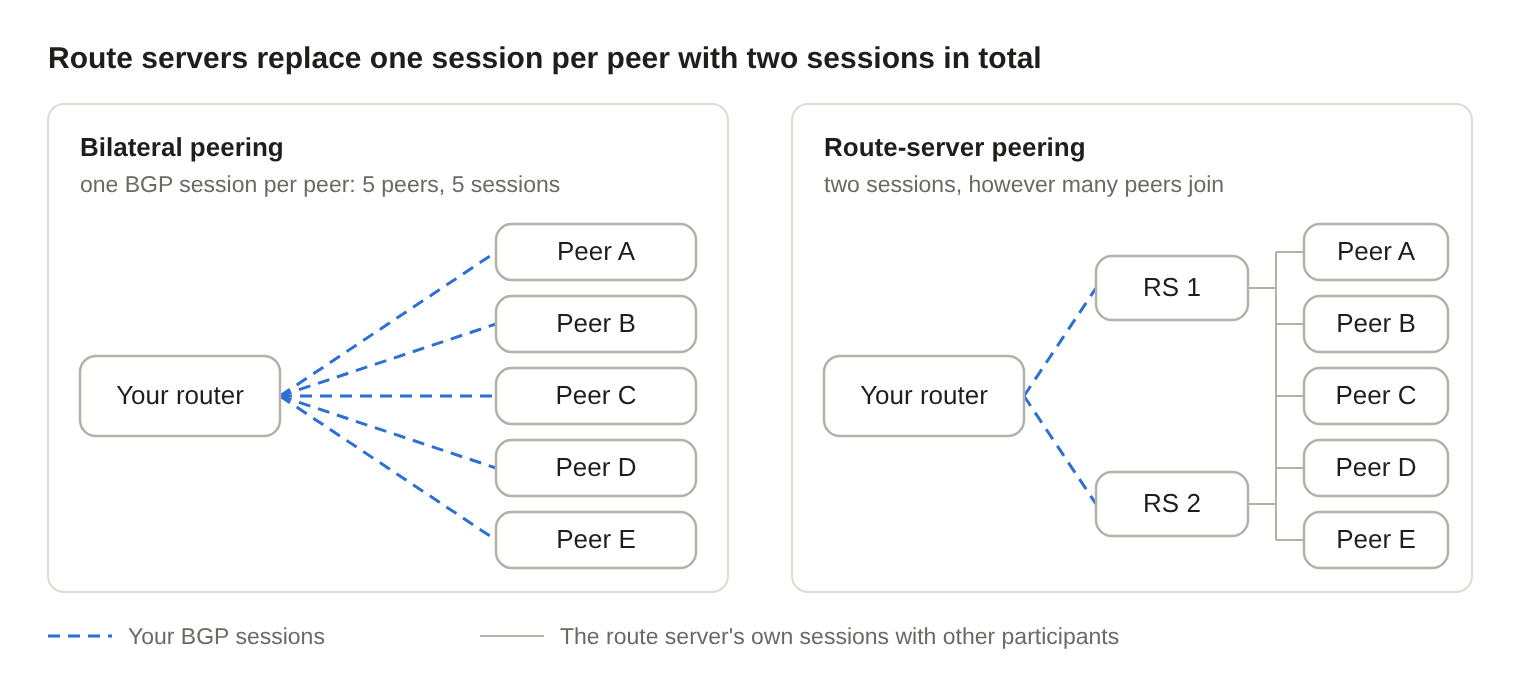
With bilateral peering, your session count grows with every peer. With route servers it stays at two; the route servers maintain the sessions with everyone else.
Three things make this work:
- Control plane only. Your router sends its route announcements to the route server, which passes them on to the other participants.
- The original next hop is kept. Each route still points to the announcing peer’s own IX address. The route server also leaves its own AS number out of the AS path, so routes look as if they came straight from the peer. (On IOS XE this is why you need
no bgp enforce-first-as, shown in the configuration below.) - Traffic goes direct. Packets to a destination learned from the route server cross the IX switch straight to that peer’s router.
Think of the route server as an introduction service, not a middleman. It tells everyone who can reach what, and then gets out of the way.
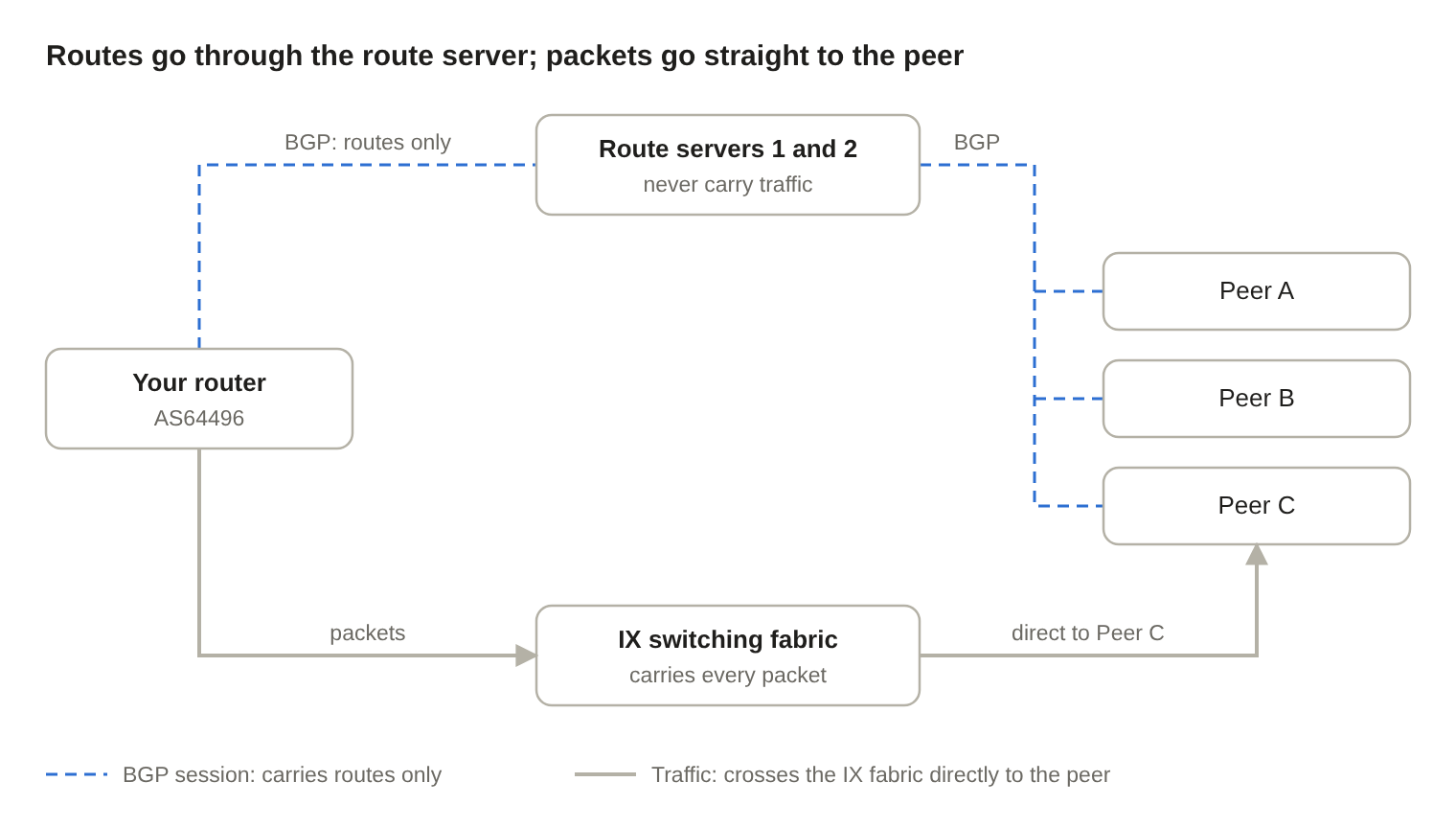
Your router learns Peer C’s routes from the route servers, but its packets to Peer C cross the IX fabric directly. The route servers never see them.
Route collectors are not route servers. Some exchanges also run route collectors. They receive BGP routes for visibility and diagnostics, but they don’t pass your routes to other participants and they carry no traffic. Only the route server provides the peering service.
Why use route-server peering
Route-server peering gives you broad reach for very little configuration. Its five main benefits:
- Broad reach on day one. Once your sessions are up, you can exchange routes with every participant using the service. On a large exchange, that can be hundreds of networks, with no negotiation required for each one.
- Much less operational overhead. Bilateral peering means contacting each network, agreeing terms, configuring sessions and passwords, and tracking changes, and that work grows with every peer. Route-server peering replaces most of it with two sessions.
- Lower transit costs. Most paid transit is billed on the 95th percentile of your usage. Traffic that moves to the IX no longer counts toward that bill. Weigh the savings against the cost of the IX port, colocation space and cross-connects.
- Built-in route filtering. Most modern route servers filter what they pass on. Equinix MLPE checks IRR and RPKI data. Other exchanges also apply bogon filters, prefix-length limits and next-hop checks. These filters vary by exchange and don’t replace your own inbound filters and prefix limits.
- Control over who hears your routes. Route servers support action communities: tags you attach to your announcements to say “don’t announce to this AS,” “announce only to these ASes,” or “prepend toward this AS.” Controlling what you receive is done on your own router, with the same inbound route-maps you’d use for any BGP neighbor.
Cisco IOS XE: route-server sessions
This configuration brings up sessions to both Equinix route servers (AS24115). It filters what we accept, limits how many prefixes we accept, and announces only our own prefixes.
Global settings and the IX interface. The interface settings below are typical IX port rules. Check your exchange’s own requirements.
ip bgp-community new-format          ! show and enter communities as ASN:value
!
interface TenGigabitEthernet0/0/1
 description Equinix IX peering LAN
 ip address 192.0.2.50 255.255.255.0
 no ip redirects
 no ip proxy-arp
 no cdp enable
 no lldp transmit
 no lldp receive
Prefix lists. We announce only our own space. We accept no default route, none of our own space, no bogons, and nothing more specific than /24. The bogon list here is shortened; use a maintained full list in production.
ip prefix-list OUR-V4 seq 10 permit 198.51.100.0/24
!
ip prefix-list IX-IN-V4 seq 5   deny 0.0.0.0/0
ip prefix-list IX-IN-V4 seq 10  deny 198.51.100.0/24 le 32
ip prefix-list IX-IN-V4 seq 20  deny 10.0.0.0/8 le 32
ip prefix-list IX-IN-V4 seq 21  deny 172.16.0.0/12 le 32
ip prefix-list IX-IN-V4 seq 22  deny 192.168.0.0/16 le 32
ip prefix-list IX-IN-V4 seq 23  deny 100.64.0.0/10 le 32
ip prefix-list IX-IN-V4 seq 24  deny 192.0.2.0/24 le 32     ! the IX LAN itself
ip prefix-list IX-IN-V4 seq 100 permit 0.0.0.0/0 ge 8 le 24
Route-maps. Inbound, we set local preference 200 so IX routes beat transit (default 100). Outbound, we tag our prefixes with 24115:24115, which tells the Equinix route servers to announce them to all participants.
route-map RS-IN-V4 permit 10
 match ip address prefix-list IX-IN-V4
 set local-preference 200
!
route-map RS-OUT-V4 permit 10
 match ip address prefix-list OUR-V4
 set community 24115:24115
BGP. no bgp enforce-first-as is required because the route servers don’t add AS24115 to the path. It is a global command, so it also applies to your other eBGP neighbors. Set maximum-prefix from what the route servers actually send in your metro, plus headroom. restart 15 brings the session back after 15 minutes instead of leaving it down.
router bgp 64496
 bgp log-neighbor-changes
 no bgp enforce-first-as
 no bgp default ipv4-unicast
 neighbor EQIX-RS-V4 peer-group
 neighbor EQIX-RS-V4 remote-as 24115
 neighbor EQIX-RS-V4 description Equinix MLPE route servers
 neighbor 192.0.2.253 peer-group EQIX-RS-V4
 neighbor 192.0.2.254 peer-group EQIX-RS-V4
 !
 address-family ipv4 unicast
  network 198.51.100.0 mask 255.255.255.0
  neighbor EQIX-RS-V4 send-community both
  neighbor EQIX-RS-V4 route-map RS-IN-V4 in
  neighbor EQIX-RS-V4 route-map RS-OUT-V4 out
  neighbor EQIX-RS-V4 maximum-prefix 100000 90 restart 15
  neighbor 192.0.2.253 activate
  neighbor 192.0.2.254 activate
 exit-address-family
The network statement needs a matching route in the routing table, usually a static route to Null0 for the aggregate. If you asked Equinix for MD5 authentication, add neighbor EQIX-RS-V4 password <secret>.
Cisco IOS XE: controlling who hears your routes
To steer your announcements, change the set community line in the outbound route-map. These values come from Equinix’s MLPE community table (other exchanges use different values):
! Announce to everyone except AS64511
route-map RS-OUT-V4 permit 10
 match ip address prefix-list OUR-V4
 set community 24115:24115 0:64511
!
! Announce only to AS64510 and AS64512
route-map RS-OUT-V4 permit 10
 match ip address prefix-list OUR-V4
 set community 0:24115 24115:64510 24115:64512
!
! Announce to everyone, but prepend our AS twice toward AS64511
route-map RS-OUT-V4 permit 10
 match ip address prefix-list OUR-V4
 set community 24115:24115 65502:64511
Standard communities can’t hold a 32-bit AS number. For those peers, Equinix also accepts large communities (RFC 8092, for example 24115:0:ASN for “don’t announce to this ASN”) and extended communities. Equinix’s own Cisco examples use set extcommunity rt for 32-bit ASNs. Check the current table and confirm what your IOS XE release supports before relying on either.
Drawbacks and risks
Route-server peering trades control and visibility for convenience. These are the six trade-offs to plan for.
1. You may not see every path
When several peers announce the same prefix, the route server may send you only its own best path. You lose sight of the alternatives and the chance to choose between them. This is the main reason route-server peering gives you less traffic-engineering control than bilateral sessions.
On IOS XE, show bgp ipv4 unicast 203.0.113.0/24 lists the paths you actually received. If a prefix you expected from several peers shows a single path from each route server, this is why.
2. Data-plane failures can go undetected
This is the risk I think is overlooked most often. Your BGP session is with the route server, not with the peer that forwards your traffic. If the path to one peer’s router breaks, but both of you can still reach the route server, your session stays up and the broken route stays installed.
The same applies to your own port. Route-server sessions and production traffic share the same physical IX port, so a failing optic can drop packets while the BGP sessions look healthy.
A bilateral session gives you a direct relationship to monitor, and BFD (Bidirectional Forwarding Detection) can detect failures faster where both sides support it. Neither guarantees detection of every data-plane problem.
For your most important route-server peers, a simple IP SLA probe to their IX address at least alerts you when the path to them fails:
ip sla 10
 icmp-echo 192.0.2.10 source-interface TenGigabitEthernet0/0/1
 frequency 10
ip sla schedule 10 life forever start-time now
!
track 10 ip sla 10 reachability
 delay down 30 up 60
Send the track state to your monitoring system (for example, with an EEM applet or SNMP traps). On its own, this probe alerts you; it doesn’t change routing.
3. Shared fate
A bug or misconfiguration on a route server can affect routes from many peers at once. That’s why exchanges run two route servers: peer with both.
If both sessions fail and their routes are withdrawn, traffic falls back to transit, but only if transit routes exist, your policy prefers them next, and the transit links have room. Recovery is not always instant, and transit usage can jump sharply.
4. Port and downstream capacity
Route-server peering can move traffic from many networks onto your IX port at once. Size the port for both normal and failure conditions, and watch it closely during rollout.
Inbound and outbound traffic are steered with different tools:
- Outbound (traffic you send): your own local preference and route filters.
- Inbound (traffic you receive): the action communities you attach to your announcements.
And look past the edge. If a 20G IX port feeds an oversubscribed 10G aggregation link, firewall or WAN circuit, the bottleneck is still there. More external paths don’t create more end-to-end capacity.
5. Not every network uses route servers
Many networks prefer or require bilateral sessions, especially for high-volume traffic. Some large content networks use route servers at many exchanges; others don’t. Before counting on a specific network, check its PeeringDB record for its peering policy and route-server participation.
6. Bilateral peering is not physical redundancy
Bilateral and route-server sessions can run over the same IX port, the same peering VLAN and the same switching fabric. Equinix supports both on one IX connection.
If you add a bilateral session with a network you already reach through the route servers, you gain policy control and direct session visibility. You don’t gain another physical path or more capacity. The packets still cross the same shared infrastructure.
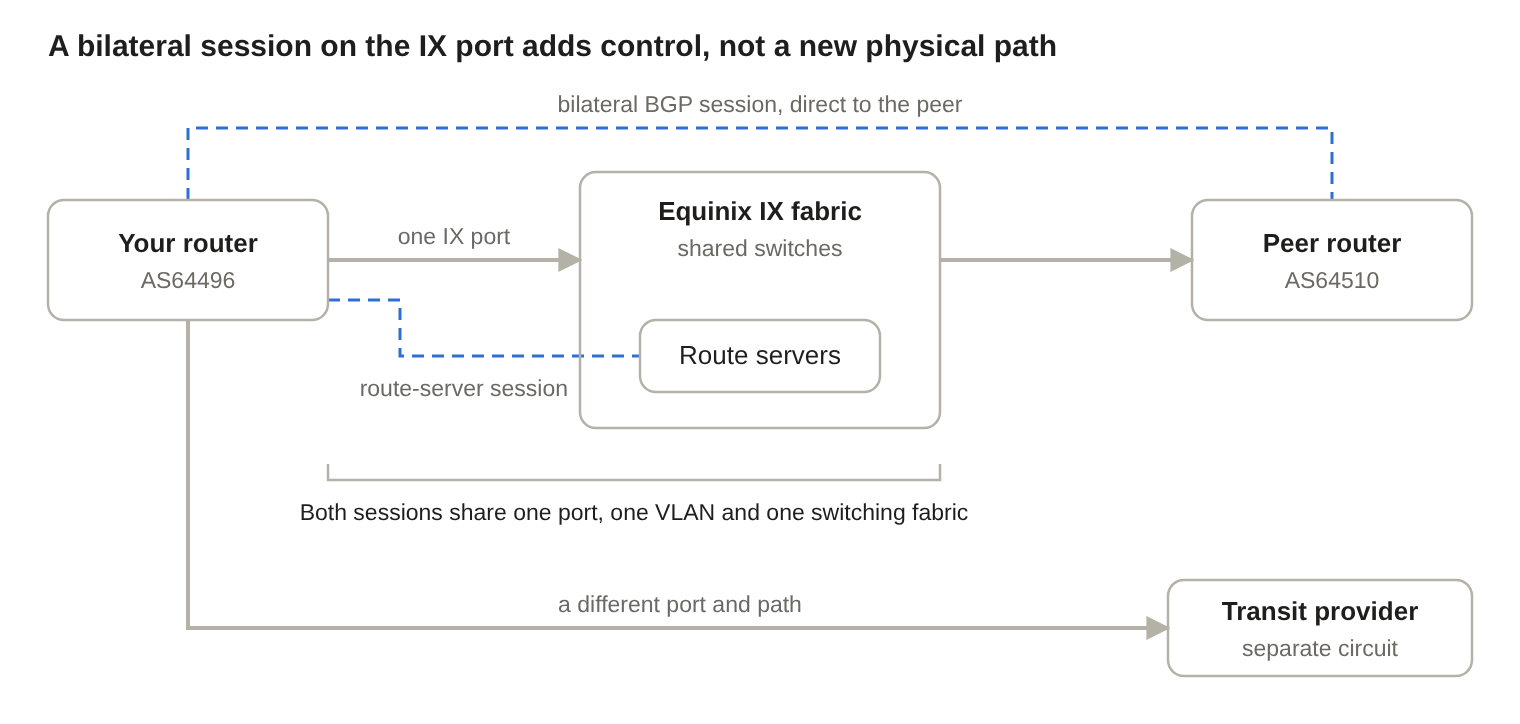
If the IX port, optic or fabric fails, the route-server session and the bilateral session go down together. Only the transit circuit is a separate path.
Design principle: count distinct failure domains, not distinct BGP neighbors. Check the port, switch fabric, metro, transport, router, firewall and downstream dependencies before claiming added resiliency.
At a glance
| Route server (multilateral) | Bilateral | |
|---|---|---|
| BGP sessions | Two (one per route server) | One per peer |
| Setup time | Fast: many networks at once | Slow: one negotiation and config per peer |
| Ongoing effort | Low | Grows with every peer |
| Paths visible | May be limited to the route server’s best path | Every path each peer sends you |
| Failure detection | A single peer’s data-plane failure may go unnoticed | Direct session monitoring; BFD where supported |
| Announcement control | Route-server action communities | Full per-peer policy |
| Best for | The “long tail” of small and mid-sized networks | Your highest-volume and most important peers |
My recommendation: use both
For most networks this isn’t an either-or choice. Use route servers for breadth and bilateral sessions where control matters:
- Use the route servers to reach the long tail of small and mid-sized networks with almost no effort.
- Use flow data (NetFlow/IPFIX) to find which networks actually send and receive most of your IX traffic. Those are your bilateral candidates.
- Build bilateral sessions with those top partners. Add BFD where both sides support it and you need the faster failure detection.
- Set a deliberate local-preference policy, so you decide which path wins when a route server and a bilateral peer advertise the same prefix.
The IOS XE configuration for each step follows.
Step 2: Find your top IX partners with Flexible NetFlow
Export flows from the IX interface to your collector, which maps addresses to ASNs and ranks your peers by traffic volume.
flow exporter EXP-COLLECTOR
 destination 10.0.0.20
 source Loopback0
 transport udp 2055
 export-protocol ipfix
!
flow monitor IX-MON-V4
 record netflow ipv4 original-input
 exporter EXP-COLLECTOR
!
interface TenGigabitEthernet0/0/1
 ip flow monitor IX-MON-V4 input
 ip flow monitor IX-MON-V4 output
Step 3: A bilateral session with BFD
This example peers with AS64510 at 192.0.2.10 on the same IX LAN. It reuses the inbound IX filter from the route-server example and adds a per-peer prefix limit. For important peers, a prefix list built from their IRR records is stricter still.
interface TenGigabitEthernet0/0/1
 bfd interval 300 min_rx 300 multiplier 3
!
route-map BILAT-IN-V4 permit 10
 match ip address prefix-list IX-IN-V4
 set local-preference 250
!
route-map BILAT-OUT-V4 permit 10
 match ip address prefix-list OUR-V4
!
router bgp 64496
 neighbor 192.0.2.10 remote-as 64510
 neighbor 192.0.2.10 description AS64510 bilateral - Equinix IX
 neighbor 192.0.2.10 password <agreed-secret>
 neighbor 192.0.2.10 fall-over bfd
 !
 address-family ipv4 unicast
  neighbor 192.0.2.10 activate
  neighbor 192.0.2.10 route-map BILAT-IN-V4 in
  neighbor 192.0.2.10 route-map BILAT-OUT-V4 out
  neighbor 192.0.2.10 maximum-prefix 5000 90 restart 15
 exit-address-family
Set each prefix limit from the peer’s PeeringDB record plus headroom. Confirm with the peer that they run BFD with compatible timers; otherwise leave out fall-over bfd.
Step 4: A deliberate local-preference policy
The examples in this post use these values. Treat them as a starting point, not a rule:
| Path | Local preference | Reason |
|---|---|---|
| Bilateral peer | 250 | Direct session, full policy control, BFD |
| Route server | 200 | Direct over the IX, but less visibility |
| Transit | 100 (default) | Reaches everything; used when no IX path exists |
Don’t assume bilateral routes should always win. A bilateral peer reached over a congested or remote-peering link may be worse than the same peer through another path. To override the default for specific prefixes, add a more specific entry above the general one:
ip prefix-list PREFER-TRANSIT-V4 seq 10 permit 203.0.113.0/24
!
route-map BILAT-IN-V4 permit 5
 match ip address prefix-list PREFER-TRANSIT-V4
 set local-preference 90
Bottom line: route-server peering gives you breadth with little configuration. Bilateral peering gives you finer control where it matters most. Neither removes the need for capacity planning and a routing design the team can support, which is what Part 2 is about.
Part 2: Operational readiness
MLPE should never be treated as two BGP neighbors and a diagram update. It adds routing paths and dependencies, and the team has to be ready to run them.
The hidden cost: operational complexity
I’ve always believed in keeping enterprise networks as simple as possible. That doesn’t mean using fewer technologies. It means building a network that is easy to understand, operate and troubleshoot.
MLPE reduces the work of setting up individual peering sessions. But it also adds paths and dependencies that didn’t exist when your traffic went through two transit providers.
Take an application with intermittent packet loss. Before MLPE, you checked your two Internet providers and your internal network. Now you also have to consider the IX fabric, dozens of peers, route-server announcements, next-hop reachability, and whether traffic leaves and returns by different paths. That gets much harder when only part of the team understands the design.
So the real question is: are we gaining enough performance, reliability or cost savings to justify the added complexity? If MLPE significantly cuts transit usage, improves reachability to important networks, or measurably improves performance, it’s worth doing. If the gains are negligible, you’re adding work without solving a real problem.
My approach: start with the simplest architecture that meets the requirements. Add routing paths only when there’s a measurable benefit, a documented operating model, and a team ready to support it.
Prerequisites
- A public ASN and authorized prefixes. Use a public ASN and make sure you’re authorized to originate every prefix you announce. Provider-assigned space may need the address holder’s authorization and matching IRR and RPKI records.
- A presence at the exchange. A router in a facility where the IX is available (or a remote-peering connection), plus the port and cross-connect.
- Accurate IRR records and RPKI ROAs for every prefix you originate. RPKI “invalid” and “unknown” are not the same; check how your exchange treats each.
- A PeeringDB record. Exchanges and peers use it to find you and check your details.
- Your own filters. Inbound prefix filters and maximum-prefix limits on every IX session, even though the route server also filters.
A stable foundation first
Before adding Internet paths, you need a stable starting point: healthy transit, predictable BGP policy, understood traffic patterns, and working monitoring. If you’re already chasing unexplained packet loss, asymmetric paths or congestion, adding MLPE makes those problems harder to isolate.
The network doesn’t have to be perfect. Its current behavior just has to be understood, measured and supportable before you add variables.
The whole team needs to understand it
A network change shouldn’t be understood only by the engineer who builds it. Before production, everyone on the network engineering and operations team should be able to explain:
- What is changing: which IX services, route servers, peers and sessions, and which prefixes are announced and received.
- Why: better reachability, lower transit cost, better paths, resiliency, or relief of a verified capacity problem.
- How routing changes: local preference, AS-path behavior, filters, communities, and the intended order of bilateral peers, route servers and transit.
- What happens during a failure: how routes withdraw, where traffic moves, whether the other links have room, and how to roll back.
- How to troubleshoot it: where to find routes and next hops, flow data, interface counters, provider contacts and the current network diagram.
Management doesn’t need to configure BGP. It should understand the purpose, expected benefits, dependencies, risks, capacity assumptions and rollout plan before approving the change.
Baseline, controlled rollout and rollback
Turn MLPE on in stages, measure each one against a baseline, and keep a tested way back. An established BGP session is not, by itself, proof of a successful change.
Record a baseline
Before activation, capture transit and IX utilization, top destination ASNs, route counts, best paths for key prefixes, latency, packet loss, and the load on downstream links. Save the output of commands like these:
show bgp ipv4 unicast summary
show ip route summary
show bgp ipv4 unicast 203.0.113.0/24          ! repeat for your key destinations
show interfaces TenGigabitEthernet0/0/1 | include rate|drops|errors
show interfaces <transit-interface> | include rate|drops|errors
Agree in advance on what counts as an acceptable change. Then test the failure case in a maintenance window: shut the route-server sessions and confirm traffic returns to transit with enough headroom.
Roll out in three stages
Each stage changes one thing, so you can see its effect on its own. Start with the neighbors configured but shut down.
Stage 1: Learn routes, but don’t use them or announce anything. Inbound routes get local preference 50, below transit’s 100, and nothing is sent out.
route-map RS-IN-STAGE1-V4 permit 10
 match ip address prefix-list IX-IN-V4
 set local-preference 50
!
route-map DENY-ALL deny 10
!
router bgp 64496
 address-family ipv4 unicast
  neighbor EQIX-RS-V4 route-map RS-IN-STAGE1-V4 in
  neighbor EQIX-RS-V4 route-map DENY-ALL out
 exit-address-family
 no neighbor 192.0.2.253 shutdown
 no neighbor 192.0.2.254 shutdown
Check that the sessions are up, the received-route count looks right, and nothing is advertised:
show bgp ipv4 unicast summary
show bgp ipv4 unicast neighbors 192.0.2.253 | include Prefixes Current
show bgp ipv4 unicast neighbors 192.0.2.253 advertised-routes
One caveat: local preference only decides between routes for the same prefix. If your transit providers send only a default route, every more specific IX route wins on longest match, whatever its local preference. In that case, stage 1 already moves outbound traffic. Use a restrictive inbound prefix list instead, and widen it in stage 3.
Stage 2: Announce your prefixes. This moves inbound traffic onto the IX. Swap in the production outbound route-map and watch the IX port’s input rate.
router bgp 64496
 address-family ipv4 unicast
  neighbor EQIX-RS-V4 route-map RS-OUT-V4 out
 exit-address-family
!
clear bgp ipv4 unicast 192.0.2.253 soft out
clear bgp ipv4 unicast 192.0.2.254 soft out
Stage 3: Prefer IX routes. This moves outbound traffic onto the IX. Swap in the production inbound route-map (local preference 200) and watch the IX port’s output rate and the transit links.
router bgp 64496
 address-family ipv4 unicast
  neighbor EQIX-RS-V4 route-map RS-IN-V4 in
 exit-address-family
!
clear bgp ipv4 unicast 192.0.2.253 soft in
clear bgp ipv4 unicast 192.0.2.254 soft in
Compare every stage with the baseline before moving on.
Rollback
The gentle way is to drain traffic first, then drop the sessions. Lower the local preference so outbound traffic moves to transit. Then tag your announcements with the graceful-shutdown community (65535:0, RFC 8326), which Equinix’s route servers honor, so inbound traffic moves too:
route-map RS-IN-V4 permit 10
 set local-preference 50
!
route-map RS-OUT-V4 permit 10
 set community 24115:24115 65535:0
!
clear bgp ipv4 unicast 192.0.2.253 soft
clear bgp ipv4 unicast 192.0.2.254 soft
Once traffic has moved, shut the sessions down:
router bgp 64496
 neighbor 192.0.2.253 shutdown
 neighbor 192.0.2.254 shutdown
In an emergency, skip the drain and go straight to shutdown. Expect a short disruption while routes reconverge onto transit.
Troubleshooting after MLPE goes live
A healthy route-server session doesn’t prove that every peer’s forwarding path is healthy. Troubleshooting has to follow the path the traffic actually takes.
Imagine traffic to an application used to leave through transit. After MLPE, its preferred path exits through an IX peer. Now users report intermittent loss. The problem could be the transit provider, your router, the IX fabric, the peer’s router, a policy change or a downstream bottleneck. Work through it in this order, from the router that forwards the traffic:
1. Which path did BGP choose? Look for the next hop, the AS path, the local preference, and whether the route came from a route server, a bilateral peer or transit.
show bgp ipv4 unicast 203.0.113.0/242. Where is the router actually forwarding? Confirm the outgoing interface and next hop in the forwarding table.
show ip cef 203.0.113.10 detail3. Can you reach the peer’s next hop across the IX? Check that its address resolves on the IX LAN, then ping it from the IX interface.
show ip arp 192.0.2.10
ping 192.0.2.10 source TenGigabitEthernet0/0/1 repeat 1000 size 1500
4. Is the destination reachable along that path? Test from the relevant device and source address. A traceroute from an unrelated network doesn’t test the IX path you care about.
traceroute 203.0.113.10 source <inside-interface>5. Is your own port healthy? Look for errors, drops and optic levels. A failing optic can drop packets while every BGP session stays up.
show interfaces TenGigabitEthernet0/0/1 | include rate|drops|errors|CRC
show interfaces TenGigabitEthernet0/0/1 transceiver detail
6. Is BFD or the IP SLA probe reporting a problem? This applies to bilateral peers and any peers you probe.
show bfd neighbors details
show ip sla statistics 10
show track 10
7. Did traffic shift somewhere unexpected? Compare current flows and link loads with the baseline, including downstream links.
show flow monitor IX-MON-V4 cache format tableIf the problem is beyond your router, work with the exchange or the peer, and give them measurements taken at the right points: timestamps, source and destination addresses, and the next hop you’re using. Agree on this process and document it before deployment, so nobody has to reconstruct it during an incident.
Worked example: should we add Hurricane Electric?
Before ordering another connection, check what your existing connections can already do. Take a common proposal: “Let’s add Hurricane Electric.”
First, pin down which service is actually being proposed. Hurricane Electric (AS6939) is a network that offers both peering and IP transit. Equinix IX is an exchange platform. They are not competing versions of the same product.
Hurricane Electric has an open peering policy and is present at Equinix IX locations. But its PeeringDB record says “Never via route servers”, so enabling Equinix MLPE does not give you a path to AS6939. You need a bilateral session. Its peering policy also expects peers to peer at every exchange you have in common.
What are the options?
| Option | What it provides | Key question |
|---|---|---|
| Equinix IX MLPE | Route exchange with many networks through the route servers | Are our current IX port capacity and policy enough? |
| Hurricane Electric bilateral peering | A direct BGP session with AS6939 over the IX we already have | Can we use our existing Equinix IX port? |
| Hurricane Electric IP transit | Paid transit to the whole Internet under a service agreement | Does it add an independent path and real capacity? |
| DE-CIX, LINX, AMS-IX | Other exchanges, with their own route-server and bilateral peers | Do they have useful peers and diversity in our metros? |
| Private network interconnect (PNI) | A dedicated link to one high-volume partner | Does the traffic justify the cost? |
Option A: Bilateral peering over the existing IX port
If Hurricane Electric agrees to peer, this adds a session, not a port. It is the bilateral template from Part 1 with one important difference: the prefix count. Hurricane Electric’s PeeringDB record lists about 210,000 IPv4 prefixes, so check that the router has the memory and that the limits fit. Use the IX addresses Hurricane Electric gives you (192.0.2.30 here is a placeholder).
router bgp 64496
 neighbor 192.0.2.30 remote-as 6939
 neighbor 192.0.2.30 description AS6939 Hurricane Electric bilateral - Equinix IX
 !
 address-family ipv4 unicast
  neighbor 192.0.2.30 activate
  neighbor 192.0.2.30 route-map BILAT-IN-V4 in
  neighbor 192.0.2.30 route-map BILAT-OUT-V4 out
  neighbor 192.0.2.30 maximum-prefix 250000 90 restart 15
 exit-address-family
This gives you more specific policy control toward AS6939. It does not add a physical path or capacity: the traffic still crosses the same IX port.
Option B: Hurricane Electric IP transit on a separate circuit
Transit is a commercial service on its own circuit and interface (203.0.113.252/31 here is a placeholder). It can add a different kind of reachability and possibly another physical path, depending on where and how it’s delivered. It sits at the bottom of the local-preference order, alongside your other transit providers.
interface TenGigabitEthernet0/0/2
 description Hurricane Electric IP transit
 ip address 203.0.113.253 255.255.255.254
!
route-map TRANSIT-HE-IN-V4 permit 10
 match ip address prefix-list IX-IN-V4
 set local-preference 100
!
route-map TRANSIT-HE-OUT-V4 permit 10
 match ip address prefix-list OUR-V4
!
router bgp 64496
 neighbor 203.0.113.252 remote-as 6939
 neighbor 203.0.113.252 description AS6939 Hurricane Electric transit
 !
 address-family ipv4 unicast
  neighbor 203.0.113.252 activate
  neighbor 203.0.113.252 route-map TRANSIT-HE-IN-V4 in
  neighbor 203.0.113.252 route-map TRANSIT-HE-OUT-V4 out
  neighbor 203.0.113.252 maximum-prefix 1200000 90 warning-only
 exit-address-family
The IX inbound filter is reused here only to drop bogons and too-specific routes. On a full-table transit session, warning-only raises an alert instead of tearing the session down when the table grows.
Is more peering the fix for congestion?
A common proposal goes: “We have too much traffic, so let’s add Network X as another IX to spread the load, and keep adding more as we grow.” (Network X, AS64511, stands in for any large network you might peer with.) That treats peering as a capacity plan, and it usually isn’t one.
Three problems with the idea:
- A network isn’t an IX. Peering with Network X over an exchange you’re already on is one more BGP session on the port you already have, not a new exchange or a new pipe.
- Peering moves traffic; it doesn’t create capacity. A new peer only helps if traffic is leaving through a congested link and a meaningful share of it is headed to that peer’s network. If the bottleneck is anywhere else, the traffic arrives at the same choke point by a different route.
- It can make things worse. A large backbone network can announce well over 100,000 prefixes. Preferring those routes can pull a large amount of traffic onto the IX port at once. If that port is the congested link, you’ve added load to it.
Design principle: find the bottleneck first, then choose the fix. Adding connections without knowing where the congestion is treats the symptom, adds failure domains, and leaves the real constraint in place.
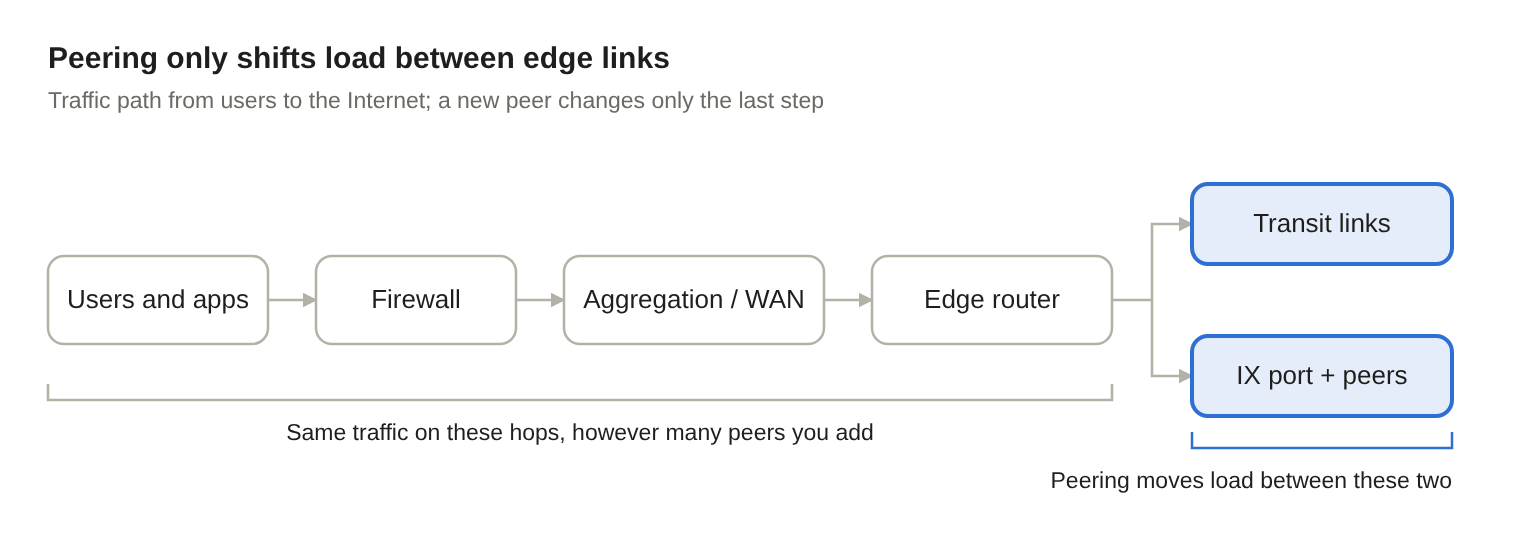
If the firewall, aggregation link, WAN circuit or edge router is the bottleneck, a new peer doesn’t help: the same traffic still crosses it.
Step 1: Find where the congestion actually is
Check every hop the traffic crosses, not just the Internet edge. On IOS XE:
! Edge links: utilization, drops and errors
show interfaces TenGigabitEthernet0/0/1 | include line|load|rate|drops   ! IX port
show interfaces <transit-interface> | include line|load|rate|drops
!
! QoS drops, if you shape or police anywhere on the path
show policy-map interface <interface>
!
! Is the router itself the limit? (ASR 1000 / Catalyst 8000 forwarding engine)
show platform hardware qfp active datapath utilization summary
!
! Then the same interface checks on aggregation links, firewalls and WAN circuits
Look at peak-hour numbers and trends, not a single snapshot. A link that hits 95% for an hour each evening is a different problem from one that’s full all day.
Step 2: Measure how much traffic would actually move
Use flow data (the Flexible NetFlow export from Part 1) to rank destination networks by traffic volume. Then check how much of your traffic currently reaches Network X through transit:
show bgp ipv4 unicast regexp _64511_That lists the routes whose AS path passes through AS64511 today. Your flow collector can total the traffic to those prefixes. If it’s 3% of your peak, peering with Network X relieves 3% at best.
Step 3: Match the fix to the bottleneck
| Where the congestion is | Peering with Network X on the existing IX port | Transit from Network X on a new circuit | The fix that addresses it |
|---|---|---|---|
| Transit links | Helps only in proportion to traffic bound for Network X | Helps: it adds capacity | Upgrade transit, or peer with the networks that flow data shows carry the most traffic |
| IX port | Makes it worse: more traffic on the same port | Helps if it lands on a separate port | Upgrade the IX port or add a port to a LAG |
| Router forwarding capacity | No | No | Upgrade the router or spread the load across routers |
| Firewall, aggregation or WAN link | No | No | Fix the downstream link or device |
| One remote network or path | Only if that network is Network X or its customers | Possibly | Work with that network directly, or a PNI if the volume justifies it |
Peering is worth adding when the data shows a congested transit link carrying a large share of traffic to the networks you’d peer with. As a general strategy of “add another IX whenever we’re full,” it adds cost, BGP sessions and troubleshooting paths without fixing the constraint. It can also carry obligations: some open-policy networks expect you to peer at every exchange you have in common.
The question to ask is: which link is full, and what will this change take off that specific link? If nobody can answer that with numbers, the proposal isn’t ready.
What about AWS, Azure and Google Cloud?
The big cloud providers are networks, not exchanges. You can’t “set them up as an IX,” and turning on Equinix MLPE doesn’t give you a path to any of them.
An exchange is a shared switch where many networks meet. AWS, Microsoft and Google are three of the networks that may (or may not) be on that switch. Whether you can exchange traffic with them there depends on each provider’s own peering policy, and all three are restrictive:
| Provider | Via route servers? | Bilateral peering at an IX | What enterprises use instead |
|---|---|---|---|
| Amazon / AWS (AS16509) | Never (PeeringDB) | Selective, requested through AWS’s peering portal. AWS says peering is not a service offering and has no SLA (policy) | AWS Direct Connect |
| Microsoft / Azure (AS8075) | Never (PeeringDB) | Selective. Requires a public ASN, a public /24, a complete PeeringDB entry, and both IPv4 and IPv6 sessions at each location. Aimed at carriers and service providers (policy) | Azure ExpressRoute |
| Google / GCP (AS15169) | Never (PeeringDB) | No new peering requests at exchanges since September 2025 (NANOG thread) | Google Cloud Interconnect |
What enterprises actually use
To reach your workloads in AWS, Azure or Google Cloud privately, you buy each provider’s dedicated connection service: AWS Direct Connect, Azure ExpressRoute or Google Cloud Interconnect. You can order these at a cloud on-ramp location or through a connectivity partner such as Equinix Fabric.
These services work very differently from an IX:
- One provider per connection. Each is a point-to-point BGP session with a single cloud provider. Three clouds means three separate connections, each with its own ports, contract and failure domain.
- Private routes, not Internet routes. You exchange your private address space with your VPCs or VNets, not public Internet prefixes.
- Provider-set limits. Each provider fixes its ASN, addressing and prefix limits. Exceed a limit and the session can drop.
- A supported service. You get an SLA and a support path, which settlement-free peering doesn’t offer.
Keep this private cloud routing separate from the Internet edge: in its own VRF, as in the examples below, or on separate routers. That stops your internal routes from leaking toward the IX or transit, and stops Internet routes from leaking toward your cloud networks.
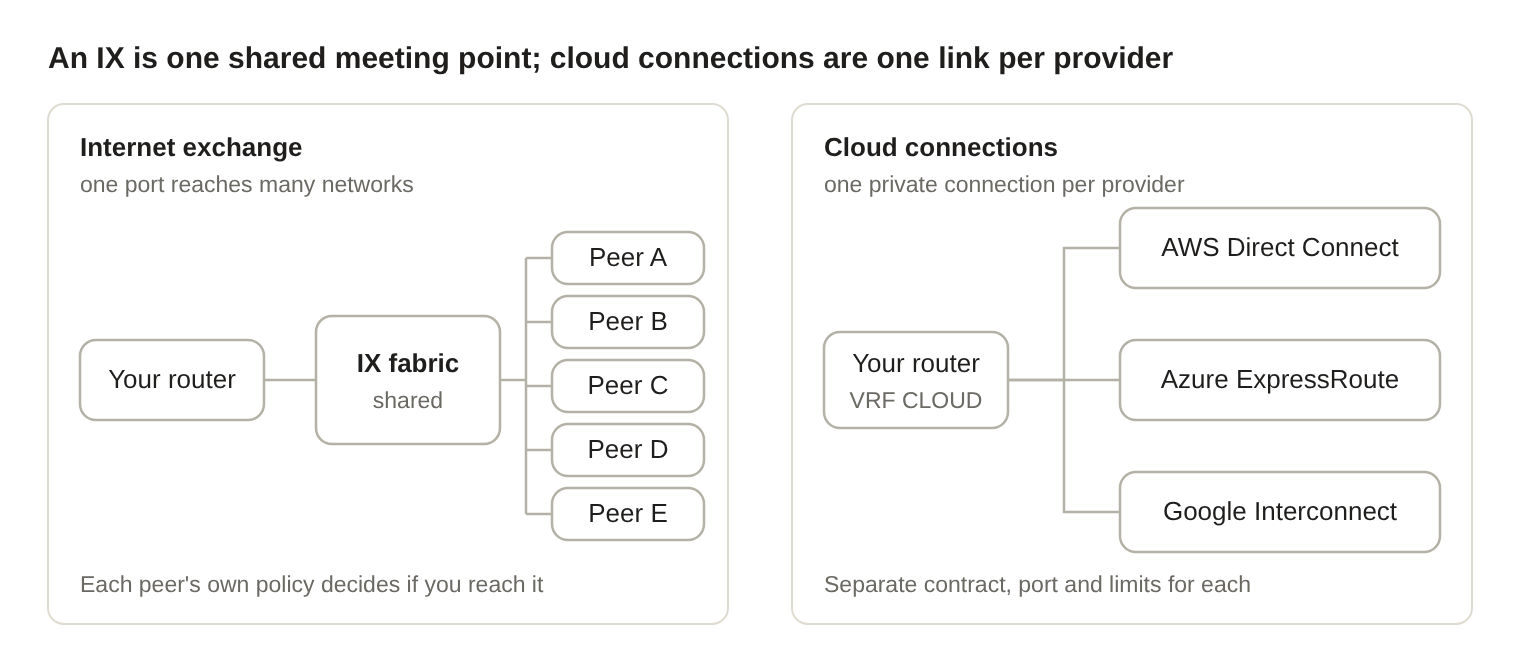
One IX port can reach many networks, but only those whose policies allow it. Each cloud provider needs its own private connection, kept in its own VRF.
Cisco IOS XE: shared VRF and filters
The examples assume on-premises space of 10.1.0.0/16 and cloud networks in 10.20.0.0/16 (AWS), 10.30.0.0/16 (Azure) and 10.40.0.0/16 (Google Cloud). Each cloud connection arrives as an 802.1Q VLAN on TenGigabitEthernet0/0/3.
vrf definition CLOUD
 rd 64496:100
 address-family ipv4
 exit-address-family
!
ip prefix-list ONPREM-TO-CLOUD seq 10 permit 10.1.0.0/16
!
route-map CLOUD-OUT permit 10
 match ip address prefix-list ONPREM-TO-CLOUD
AWS Direct Connect (private virtual interface)
AWS always enables MD5 on the BGP session; you supply the key or let AWS generate one (AWS). BFD is already on at the AWS end (300 ms × 3) but only takes effect once you configure it (Megaport). You can advertise at most 100 prefixes on a private virtual interface; this is a hard limit (AWS). Take the peer addresses, VLAN and Amazon-side ASN from the virtual interface details (64512 here).
interface TenGigabitEthernet0/0/3.101
 description AWS Direct Connect private VIF
 encapsulation dot1Q 101
 vrf forwarding CLOUD
 ip address 169.254.100.2 255.255.255.252
 bfd interval 300 min_rx 300 multiplier 3
!
ip prefix-list AWS-IN seq 10 permit 10.20.0.0/16 le 24
!
route-map AWS-IN permit 10
 match ip address prefix-list AWS-IN
!
router bgp 64496
 address-family ipv4 vrf CLOUD
  neighbor 169.254.100.1 remote-as 64512
  neighbor 169.254.100.1 description AWS Direct Connect private VIF
  neighbor 169.254.100.1 password <key-from-AWS>
  neighbor 169.254.100.1 fall-over bfd
  neighbor 169.254.100.1 activate
  neighbor 169.254.100.1 route-map AWS-IN in
  neighbor 169.254.100.1 route-map CLOUD-OUT out
  neighbor 169.254.100.1 maximum-prefix 200 90 restart 15
 exit-address-family
Azure ExpressRoute (private peering)
Microsoft always uses AS12076. Each circuit has a primary and a secondary link, each needing its own /30; you use the first address and Microsoft the second. You can advertise up to 4,000 IPv4 prefixes (10,000 with the Premium add-on), and Microsoft drops the session if you exceed the limit (Microsoft). MD5 is optional. Don’t use AS65515–65520 on your side; Microsoft reserves them.
Run the primary link on one router and the secondary on another. The primary looks like this:
interface TenGigabitEthernet0/0/3.200
 description Azure ExpressRoute private peering - primary
 encapsulation dot1Q 200
 vrf forwarding CLOUD
 ip address 172.16.0.1 255.255.255.252
 bfd interval 300 min_rx 300 multiplier 3
!
ip prefix-list AZURE-IN seq 10 permit 10.30.0.0/16 le 24
!
route-map AZURE-IN permit 10
 match ip address prefix-list AZURE-IN
!
router bgp 64496
 address-family ipv4 vrf CLOUD
  neighbor 172.16.0.2 remote-as 12076
  neighbor 172.16.0.2 description Azure ExpressRoute private peering - primary
  neighbor 172.16.0.2 fall-over bfd
  neighbor 172.16.0.2 activate
  neighbor 172.16.0.2 route-map AZURE-IN in
  neighbor 172.16.0.2 route-map CLOUD-OUT out
  neighbor 172.16.0.2 maximum-prefix 200 90 restart 15
 exit-address-family
The secondary router is identical except for the subinterface address (172.16.0.5/30) and neighbor (172.16.0.6).
Google Cloud Partner Interconnect
With Partner Interconnect, Google’s Cloud Router must use AS16550 (Google). The BGP session runs over link-local addresses (169.254.x.x) on each VLAN attachment, with a 20-second keepalive and 60-second hold timer (Google). BFD is optional; Google recommends a detection timeout of at least 5,000 ms to avoid flaps (Google), which is why these timers are slower than the others.
interface TenGigabitEthernet0/0/3.300
 description GCP Partner Interconnect - attachment 1
 encapsulation dot1Q 300
 vrf forwarding CLOUD
 ip address 169.254.10.2 255.255.255.248
 bfd interval 1000 min_rx 1000 multiplier 5
!
ip prefix-list GCP-IN seq 10 permit 10.40.0.0/16 le 24
!
route-map GCP-IN permit 10
 match ip address prefix-list GCP-IN
!
router bgp 64496
 address-family ipv4 vrf CLOUD
  neighbor 169.254.10.1 remote-as 16550
  neighbor 169.254.10.1 description GCP Cloud Router - attachment 1
  neighbor 169.254.10.1 timers 20 60
  neighbor 169.254.10.1 fall-over bfd
  neighbor 169.254.10.1 activate
  neighbor 169.254.10.1 route-map GCP-IN in
  neighbor 169.254.10.1 route-map CLOUD-OUT out
  neighbor 169.254.10.1 maximum-prefix 200 90 restart 15
 exit-address-family
For redundancy, Google’s availability designs use a second VLAN attachment on a second router (169.254.20.0/29 in Google’s example).
What to tell the business
“Set up AWS, Azure and GCP like an IX” really means “build three private connections, one per provider.” Before anyone orders them, answer:
- Which workloads in each cloud need private connectivity, and how much traffic do they carry?
- Is the goal private access to our own VPCs and VNets, or faster access to public services like Microsoft 365? Those are different products.
- What happens when a cloud connection fails: does traffic fall back to a VPN, another connection, or the Internet?
- Who supports three new BGP relationships, each with its own limits, failure behavior and contract?
Before approving any new connection
None of these options, from Hurricane Electric peering to a cloud connection, should be assumed to add resiliency or remove congestion. Before approving a new service, answer four questions:
- What specific problem are we solving?
- Why can’t our existing connections solve it?
- How much traffic will realistically move?
- What does the whole forwarding path look like, both normally and during a failure?
More connectivity can help, but it isn’t automatically better architecture. A good design isn’t measured by how many BGP sessions or Internet connections it has. It’s measured by how reliably the network runs, how predictably traffic flows, and how well the whole team can support it.